
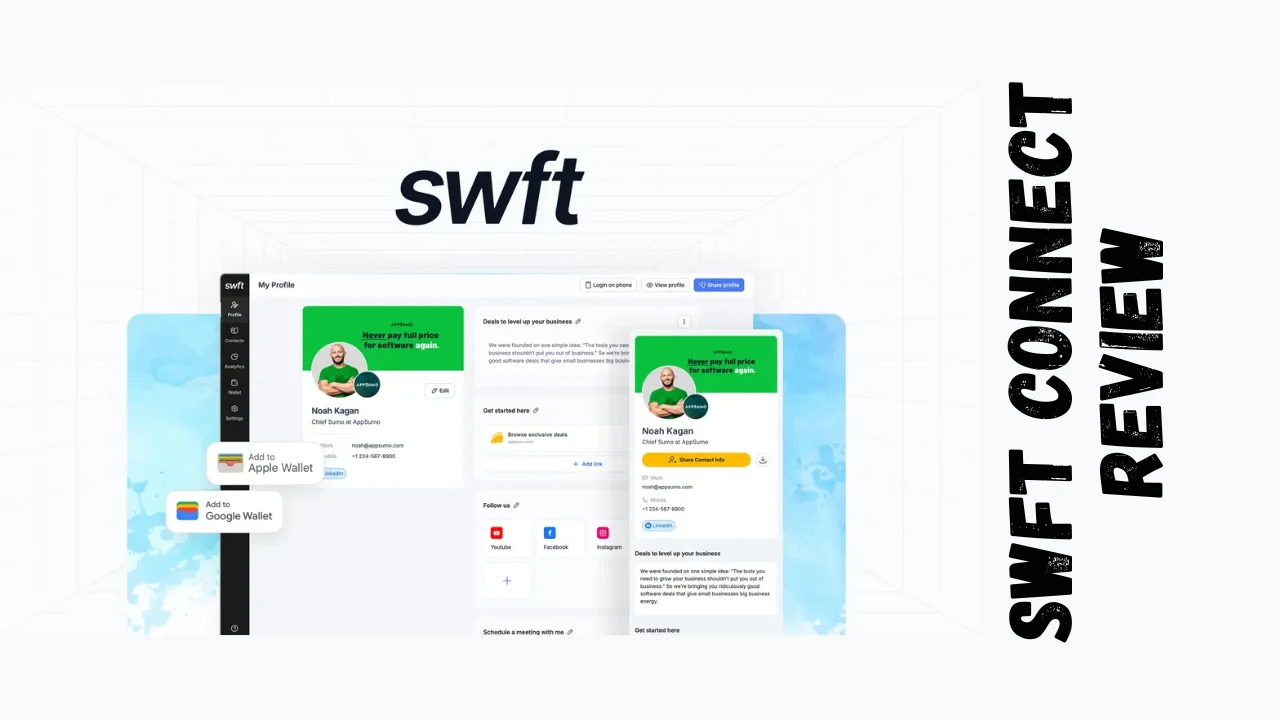
Paper business cards are outdated. Most end up crumpled in a pocket or forgotten in a drawer within days. For startups, solopreneurs, and small business owners who need every networking opportunity to count, there’s a smarter way to make connections stick. Swft Connect transforms how you share contact information by turning your phone into a powerful networking tool. This Swft Connect review breaks down everything you need to know about this digital business card platform and whether it’s worth your investment.
Overview of Swft Connect
Swft Connect is a digital business card platform designed to help professionals network more effectively in today’s mobile-first world. Instead of fumbling with paper cards that often get lost or thrown away, you can share your entire professional profile through a simple QR code, Apple Wallet pass, Google Wallet pass, or shareable link.
The platform launched with a clear mission: make networking actually work for small businesses and individual professionals who can’t afford to lose leads. Whether you’re a freelancer meeting potential clients at a coffee shop, a sales manager coordinating team outreach at conferences, or a small business owner building local connections, Swft Connect targets professionals who need lead capture and follow-up tools built right into their digital card.
Key Features That Set Swft Connect Apart
Swft Connect isn’t just a link-in-bio tool with your contact info. It’s built specifically for lead generation and professional networking. Here’s what makes it different:
Digital Business Card Creation & Customization
- Fully customizable profile pages with your logo, brand colors, and professional headshot
- Add unlimited links to social profiles, websites, portfolios, and content
- Embed videos, images, and text sections to showcase your work
- Create custom call-to-action buttons with personalized styling
- LinkedIn profile import automatically pulls your photo and info to speed up setup
Apple Wallet & Google Wallet Integration
- Generate digital wallet passes that live on your phone’s home screen
- Share your card by simply having someone scan your wallet pass QR code
- No app download required for people receiving your information
Lead Capture & Contact Management
- Custom contact forms automatically collect information from new connections
- Both parties receive a downloadable VCF file via email for easy phone saving
- Organize captured leads with tags and personal notes
- Export contacts directly to your CRM system
Analytics & Performance Tracking
- Unlimited analytics showing how people interact with your profile
- Track link clicks, form submissions, and profile views
- Company-wide analytics for teams to monitor networking performance
Team Management Features
- Centralized dashboard for managing multiple team members
- User management controls for sales teams and agencies
- Profile templates to maintain brand consistency across your organization
Advanced Integrations
- Calendar booking integrations with Calendly and TidyCal
- Facebook Pixel integration for retargeting
- Custom domain support for professional branding
- Remove platform branding for white-label client work
Ease of Use & User Experience
Setting up Swft Connect takes less than 10 minutes, even if you’re not tech-savvy. The platform offers LinkedIn import functionality that automatically pulls your profile picture, job title, and basic information, which saves time during the initial setup process.
The dashboard interface is clean and straightforward. You can edit your profile, view captured leads, check analytics, and generate QR codes all from one central hub. Users consistently mention in reviews that the platform is “easy to use” and requires minimal learning curve.
For mobile access, the digital wallet integration means your business card is literally always with you—no separate app needed. When networking in person, you just open your Apple or Google Wallet and let someone scan the QR code. The whole exchange takes about five seconds.
The lead capture experience is equally smooth. When someone scans your code, they see your full profile and can fill out a simple connect form. Both of you immediately receive a VCF contact card via email, making it easy to save each other’s information directly to your phone contacts.
Desktop functionality is fully responsive, so your profile looks professional whether someone opens it on their phone, tablet, or laptop. The platform also includes profile templates for teams, which helps maintain consistent branding when you’re managing multiple users.
Pricing Breakdown
Swft Connect offers a one-time payment lifetime deal structure, which means you pay once and own your access forever. Here’s how the pricing tiers break down:
| Plan Tier | Users | One-Time Price | Key Features |
|---|---|---|---|
| Tier 1 (Personal) | 1 user | $19 | Dashboard access, unlimited analytics, custom connect form, customizable buttons, custom domain, pixel integrations, profile templates, company analytics, user management (Note: includes branding) |
| Tier 2 (Business) | 10 users | $99 | Everything in Tier 1 + Remove branding |
| Tier 3 (Business Pro) | 100 users | $199 | Everything in Tier 2 + Scale to 100 team members |
Each plan includes a 60-day money-back guarantee, giving you two full months to test the platform risk-free. All tiers must be activated within 60 days of purchase.
Value Proposition
The Swft Connect lifetime deal pricing completely changes the math compared to traditional subscription tools. Regular annual pricing for similar platforms typically runs around $80 per year for a single user. With the one-time $19 payment, you break even in less than three months and never pay again.
For teams, the value gets even better. The Tier 2 plan at $99 for 10 users works out to less than $10 per person—for lifetime access. Competing platforms like HiHello charge $6 per user per month for similar team features, which means you’d pay $720 per year for a 10-person team. The Swft Connect Tier 2 lifetime plan pays for itself in under two months.
Pros and Cons
| Pros ✅ | Cons ❌ |
|---|---|
| Extremely affordable one-time pricing with lifetime access | Tier 1 keeps platform branding (requires Tier 2+ for white-label) |
| Apple and Google Wallet integration for instant sharing | Limited social link options compared to some competitors |
| Automatic lead capture with contact form and email delivery | Calendar integration only works with Calendly and TidyCal |
| Unlimited analytics for tracking networking performance | Some users want more onboarding videos and setup guidance |
| LinkedIn profile import speeds up initial setup | No native mobile app (though wallet integration covers this) |
| VCF file download for easy contact saving | Learning curve for non-tech-savvy users needing help with setup |
| Responsive customer service via WhatsApp | Platform still growing (newer features being added) |
| 60-day money-back guarantee removes purchase risk |
Who Should Use Swft Connect?
This Swft Connect review wouldn’t be complete without addressing who gets the most value from this platform.
Ideal Users:
- Freelancers and consultants who attend networking events and need to convert conversations into paying clients
- Sales professionals who meet prospects in person and want automatic lead capture instead of manual data entry
- Small business owners building local connections and partnerships where first impressions matter
- Startup founders networking with investors, partners, and potential hires on a tight budget
- Real estate agents and financial advisors who need professional contact sharing with analytics
- Conference attendees who want to track connections made during industry events
- Marketing agencies managing digital business cards for multiple clients with custom branding
Who Might Want Alternatives:
- Large enterprises needing complex CRM integrations beyond basic contact export
- Users who need dozens of specific calendar or scheduling tool integrations
- Teams requiring advanced workflow automation for lead follow-up
Comparison With Competitors
How does Swft Connect stack up against other digital business card and link-in-bio tools?
| Feature | Swft Connect | Linktree | HiHello |
|---|---|---|---|
| Pricing | $19 lifetime (1 user) | $5/month (Pro) | $6/user/month (Business) |
| Lead Capture Form | ✅ Built-in | ❌ Not available | ✅ Built-in |
| Wallet Integration | ✅ Apple & Google | ❌ Not available | ✅ Limited |
| Analytics | ✅ Unlimited | ✅ Limited (free) / Full (paid) | ✅ Full analytics |
| Team Management | ✅ Yes (Tier 2+) | ✅ Yes (Enterprise) | ✅ Yes |
| Remove Branding | ✅ Yes (Tier 2+) | ✅ Yes (Pro+) | ✅ Yes |
| Custom Domain | ✅ Yes | ✅ Yes (Pro+) | ✅ Yes |
| Best For | Lead generation & networking | Social media link sharing | Enterprise teams |
Linktree focuses primarily on social media link aggregation and doesn’t include lead capture or wallet functionality. It’s more suited for content creators and influencers who need a simple landing page for their Instagram bio.
HiHello offers similar digital business card features but charges monthly subscription fees. For a 10-person team, you’d pay $720 annually with HiHello versus $99 once with Swft Connect.
The Swft Connect lifetime deal makes it the most budget-friendly option for solopreneurs and small teams who want affordable software without ongoing subscription costs.
User Feedback Summary
Swft Connect has earned consistently positive reviews across multiple platforms. On Trustpilot, users rate the service highly, praising the tap-and-connect NFC feature and the quality of physical NFC cards. One verified user mentioned, “I love my new business card! You simply tap someone’s phone (or use the QR code if they have an older one) and it shares your details, links, and a handy connect button.”
The platform holds a 4.9 out of 5 rating from 55 reviews, with users particularly appreciating the highly customizable digital business cards, seamless setup process, and responsive customer service. The founder’s hands-on involvement with customer support gets mentioned frequently, with users noting quick responses via WhatsApp when they encounter setup challenges.
Common praise points include:
- Easy setup and user-friendly interface
- Great conversation starter at networking events
- High-quality, durable physical NFC cards
- VCF file download feature that goes beyond what competitors offer
- Responsive customer service
The main feedback for improvement centers on wanting more social link options, additional calendar integrations beyond Calendly and TidyCal, and more tutorial videos for initial setup. However, these are relatively minor issues that don’t significantly impact the core functionality of the platform.
Final Verdict
Swft Connect delivers exactly what busy professionals need: a simple, effective way to capture leads and share contact information without the hassle of paper business cards or subscription fees eating into your budget every month.
The platform’s Swft Connect features hit the sweet spot for productivity tools for entrepreneurs who want something that actually works without a steep learning curve. The Apple and Google Wallet integration, automatic lead capture, and unlimited analytics give you professional networking capabilities that used to require expensive enterprise software.
For the Swft Connect pricing of $19 for lifetime access, this is one of the easiest software decisions you’ll make for your business. Even if you only capture a handful of quality leads that turn into clients or partnerships, the return on investment is immediate. The 60-day money-back guarantee removes any risk from trying it out.
This tool particularly shines for freelancers, sales professionals, and small business owners who network regularly and can’t afford to let potential leads slip through the cracks. If you’re tired of collecting business cards that sit in a drawer unused, or if you’re spending too much time manually entering contact information into your CRM, Swft Connect solves both problems immediately.
The best tools for small business are the ones that pay for themselves quickly and keep working without ongoing costs. This Swft Connect review concludes that it checks both boxes. Whether you’re a solopreneur just starting out or managing a growing sales team, the value proposition here is hard to beat. For less than the cost of printing 100 paper business cards, you get a professional digital networking system that lasts forever.




