
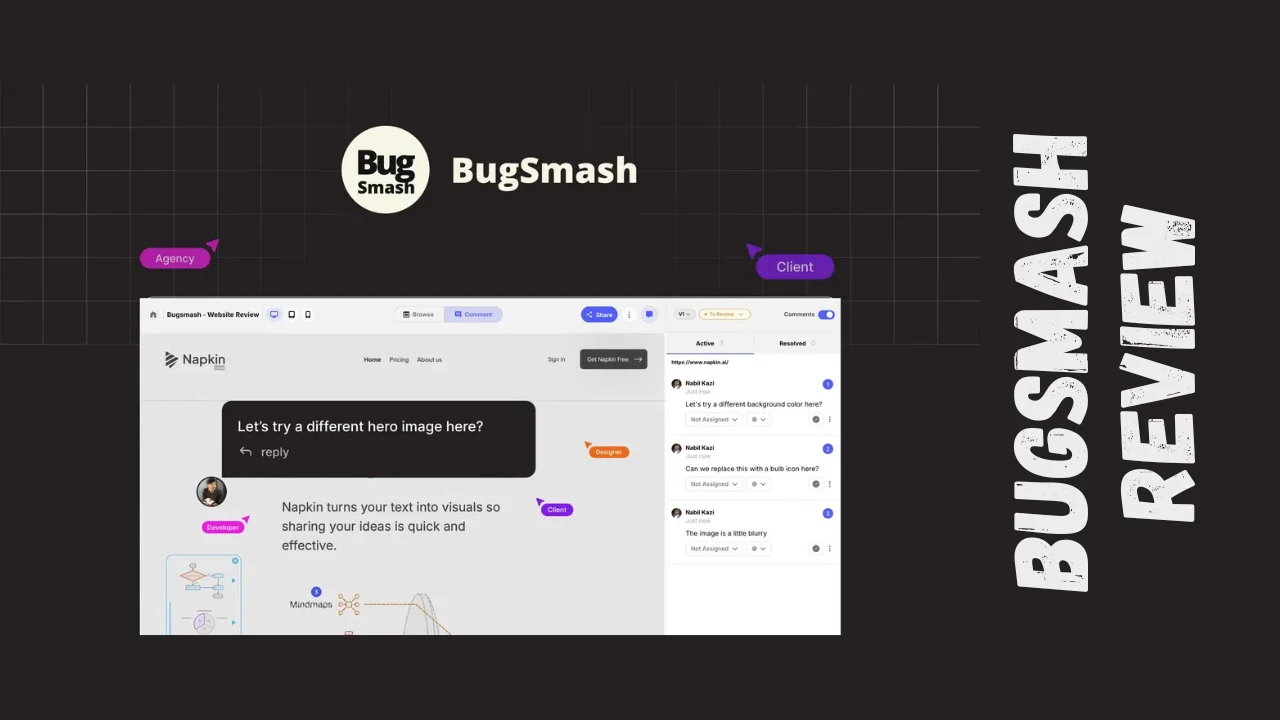
Getting clear feedback from clients shouldn’t feel like pulling teeth. BugSmash is a visual feedback and review tool designed to help agencies, freelancers, and small teams collect precise, contextual feedback on websites, PDFs, videos, images, and more—all without forcing clients to create accounts or navigate complicated platforms.
Overview of BugSmash
BugSmash launched with a simple mission: eliminate the endless back-and-forth emails, vague comments, and confusing screenshot attachments that plague creative and development projects. The platform targets marketing agencies, web design studios, product managers, and solopreneurs who need a streamlined way to gather visual feedback from clients and stakeholders without technical barriers.
The tool serves anyone who regularly shares work for review—whether you’re building websites, creating marketing materials, developing apps, or managing client projects. By centralizing feedback in one visual workspace, BugSmash helps teams move faster and reduce miscommunication that typically delays project completion.
Key Features
BugSmash packs several powerful capabilities into an intuitive interface designed for speed and simplicity:
- Multi-format support: Review live websites, mobile apps, videos, audio files, images, and PDF documents all within the same platform
- No-login guest commenting: Clients and reviewers can provide feedback instantly through a shared link without creating accounts or downloading software
- Visual annotation tools: Point-and-click commenting with screen capture, annotations, and precise location markers that show exactly what needs attention
- Screen recording: Capture video walkthroughs with voiceover to explain complex feedback that’s difficult to describe in text
- AI-powered reviews: Get intelligent suggestions and automated feedback analysis depending on your pricing tier
- Team collaboration: Tag team members, assign tasks, pause comments, and attach files directly within feedback threads
- Integration ecosystem: Connect with ClickUp, Slack, and Zapier to sync feedback with your existing project management workflow
- Organized project management: Use folders to categorize projects and keep multiple client workstreams separate
- Custom branding options: Available on higher tiers to maintain your agency’s professional appearance when sharing with clients
Ease of Use & User Experience
One of the standout aspects of this BugSmash review is how the platform prioritizes simplicity for both reviewers and project owners. The dashboard presents a clean, organized view of all your projects with straightforward navigation that doesn’t require a learning curve.
Setup takes minutes rather than hours. You simply upload your file or paste a website URL, then share a link with reviewers. There’s no browser extension requirement for basic functionality, though screen recording features may use one.
The guest reviewer experience removes all friction—clients click your link and immediately start commenting without passwords, sign-ups, or software installations. Comments pin directly to specific locations on websites, images, or PDF pages, making feedback crystal clear.
The interface works smoothly on both desktop and mobile devices, allowing stakeholders to review work from anywhere. Notifications keep everyone updated on new comments and project changes without overwhelming your inbox.
Pricing Breakdown
BugSmash offers three lifetime deal tiers with one-time payment options that provide exceptional value compared to monthly subscription models:
| Feature | Tier 1 | Tier 2 | Tier 3 |
|---|---|---|---|
| One-time Price | $79 | $199 | $299 |
| Projects/Files | 75 | 250 | Unlimited |
| Team Members | 2 | 10 | Unlimited |
| Collaborators | 5 | 10 | Unlimited |
| Total Storage | 20GB | 50GB | 250GB |
| Max File Size | 100MB | 500MB | 1GB |
| AI Reviews | 5 | 20 | 100 |
| Custom Branding | ❌ | ❌ | ✅ |
| Integrations | ✅ | ✅ | ✅ |
| Screen Recording | ✅ | ✅ | ✅ |
| Guest Commenting | ✅ | ✅ | ✅ |
All tiers include lifetime access with a 60-day money-back guarantee, eliminating subscription fatigue and providing long-term value. There’s also a free version available for testing basic functionality before committing.
Pros and Cons
| Pros | Cons |
|---|---|
| Zero-friction client experience with no login required | Limited integrations compared to enterprise-focused competitors |
| Lifetime deal pricing offers excellent long-term value | AI review feature availability depends on tier limits |
| Multi-format support (websites, PDFs, videos, images, audio) | No two-way integration with project management tools |
| Visual annotations eliminate vague feedback | Storage caps may require tier upgrades for video-heavy projects |
| Quick setup with minimal technical requirements | Custom branding only available on highest tier |
| 60-day refund policy removes purchase risk | Fewer advanced features than premium alternatives like Usersnap |
| Screen recording for complex feedback | – |
Who Should Use BugSmash?
This BugSmash review reveals the tool works best for specific user profiles:
Marketing agencies benefit from the multi-format support and guest commenting that simplifies client approvals on campaigns, websites, and creative assets. The custom branding option helps maintain professional presentation throughout the review process.
Web design agencies and freelancers save hours by eliminating confusing email threads and getting precise visual feedback on layouts, functionality, and content. The screen recording feature helps capture complex user experience issues.
Product managers can gather stakeholder input on prototypes, specs, and design documents without training non-technical reviewers on complicated tools. The integration with ClickUp and Slack keeps feedback synchronized with development workflows.
Solopreneurs and consultants appreciate the affordable pricing—especially the lifetime deal options—and the professional impression created by streamlined feedback collection. The tool scales as your business grows without forcing plan upgrades.
Small business owners who outsource creative work gain better oversight and communication with contractors through centralized, visual feedback. The productivity tools for entrepreneurs help manage multiple projects efficiently.
Comparison With Competitors
| Feature | BugSmash | MarkUp.io | Ruttl |
|---|---|---|---|
| Starting Price | $79 lifetime | $25/month | $10/month per user |
| Guest Commenting | Yes, no login | Yes | Limited |
| Live CSS Editing | No | No | Yes |
| Multi-format Support | Websites, PDFs, videos, images, audio | Websites, images | Primarily websites |
| Integrations | ClickUp, Slack, Zapier | Limited | Limited |
| Screen Recording | Yes | No | Yes |
| Pricing Model | One-time lifetime deal | Monthly subscription | Monthly per user |
BugSmash stands out with its comprehensive multi-format capabilities and exceptional BugSmash lifetime deal pricing that eliminates ongoing subscription costs. While Ruttl offers live CSS editing for designers who need in-browser styling changes, BugSmash provides broader file format support including PDFs and videos. MarkUp.io costs significantly more annually ($300/year) compared to BugSmash’s one-time payment.
For teams seeking best tools for small business with tight budgets, BugSmash delivers professional feedback capabilities without the premium price tag of enterprise solutions. The affordable software positioning makes it accessible for startups and growing agencies.
User Feedback Summary
Direct user reviews for BugSmash specifically are limited on major platforms, but the tool has garnered positive attention since its launch. The platform shows 14 reviews with a generally favorable sentiment among early adopters.
Users appreciate the frictionless client experience—the no-login guest commenting feature consistently receives praise for eliminating onboarding friction. The visual annotation capabilities help teams communicate more precisely than text-only feedback systems.
Agencies report significant time savings by centralizing feedback rather than tracking comments across emails, Slack messages, and spreadsheets. The screen recording feature helps capture complex issues that are difficult to describe in writing.
Some users note that while the integration options cover essential tools like Slack and ClickUp, the platform lacks the extensive integration library of more established competitors. Teams heavily invested in specific project management ecosystems may need to evaluate whether the available integrations meet their workflow requirements.
Final Verdict
This BugSmash review reveals a practical, affordable visual feedback solution that solves real problems for agencies, freelancers, and small teams. The platform excels at what matters most: making it easy for clients and stakeholders to provide clear, contextual feedback without technical barriers.
The BugSmash pricing structure—particularly the lifetime deal tiers—delivers outstanding value for teams tired of subscription fatigue. At $79 for the entry tier, you get lifetime access to professional feedback tools that competing platforms charge hundreds per year to access.
The BugSmash features cover the essential capabilities most teams need: multi-format support, visual annotations, screen recording, and no-login guest access. While power users might miss advanced functionality like live CSS editing or extensive integration libraries, the core feedback collection experience is solid and intuitive.
Who benefits most? Marketing and web design agencies handling multiple client projects, solopreneurs building their service business, and product teams needing stakeholder input without complex tool training. If you regularly gather feedback on websites, designs, or documents and want to eliminate communication chaos, BugSmash delivers exactly what you need.
The 60-day money-back guarantee removes any risk from testing whether the platform fits your workflow. For teams seeking productivity tools for entrepreneurs that actually save time and reduce frustration, BugSmash earns a strong recommendation as one of the best tools for small business in the visual feedback category.




