
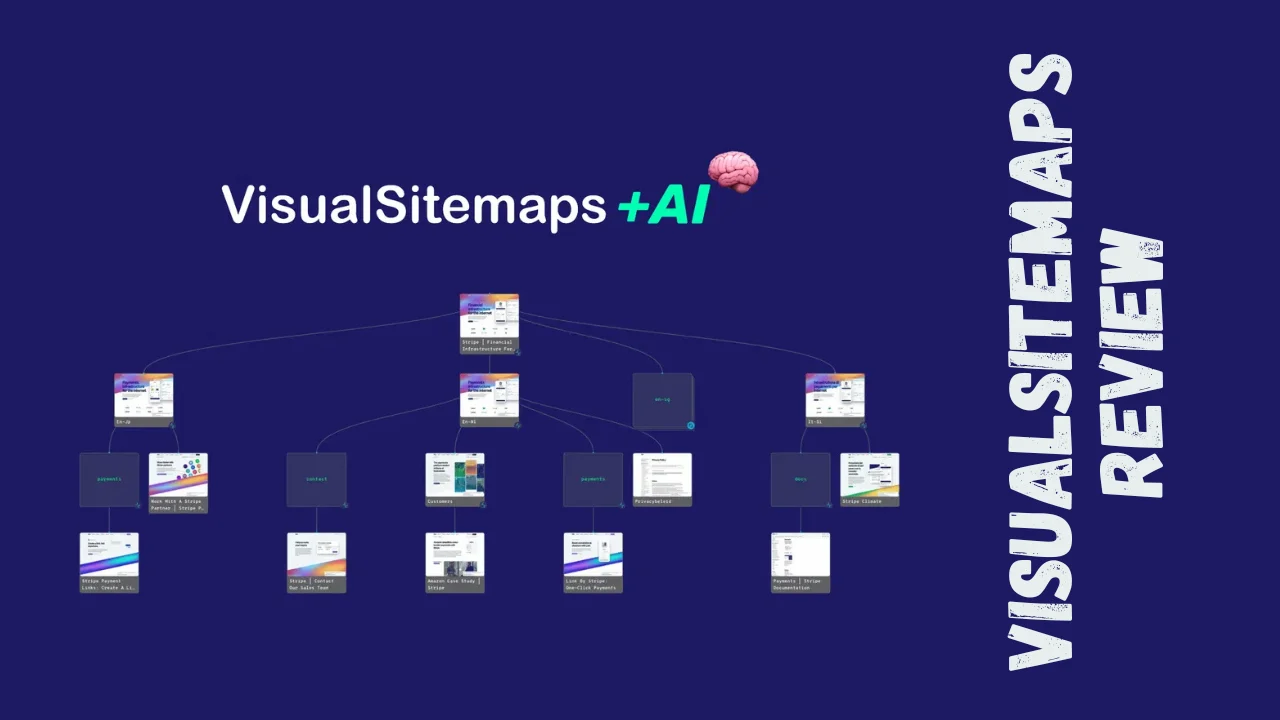
Ever stared at a client’s massive website and wished you could see the entire structure in one glance? VisualSitemaps is a web-based tool that automatically generates visual sitemaps complete with screenshots, helping web developers, marketers, and UX designers understand site architecture, plan content strategies, and conduct competitive analysis. This VisualSitemaps review will walk you through everything you need to know about whether this tool deserves a spot in your productivity stack.
Overview of VisualSitemaps
VisualSitemaps is designed to solve a problem that’s plagued web professionals for years: understanding complex website structures without manually clicking through hundreds of pages. The platform automatically crawls any live or staging website and creates interactive visual maps with page screenshots, making it incredibly easy to see how a site is organized at a glance.
The tool targets web design agencies, marketing agencies, SaaS companies, UX designers, and SEO specialists who need to audit websites, plan redesigns, or analyze competitor sites. Whether you’re a solopreneur managing client projects or part of a small team handling multiple websites, VisualSitemaps streamlines workflow and replaces multiple paid services.
Key Features
VisualSitemaps packs several powerful features that make website visualization and planning significantly easier:
- Automated Visual Sitemap Generation: Crawl any website and automatically generate a complete visual sitemap with high-resolution screenshots of every page
- AI-Powered Insights: Uses AI to analyze website architecture and identify what to keep, merge, remove, or build next
- Flow Board Creation: Design user flows, customer journeys, and wireframes with unlimited flow boards available on certain plans
- Custom Tagging System: Apply custom tags to pages for quick reference and organization during audits
- Screenshot Export: Download high-resolution screenshots of any page for presentations or documentation
- Collaboration Tools: Add comments and tasks directly on webpage screenshots, replacing dedicated project management tools
- Sitemap Editing: Manually adjust and reorganize your sitemap structure with drag-and-drop functionality
- SEO and UX Auditing: Identify SEO gaps, content bloat, and user experience issues through visual analysis
- Competitor Analysis: Crawl and analyze competitor websites to understand their content strategy and site structure
Ease of Use & User Experience
VisualSitemaps shines when it comes to usability. Users consistently praise the minimal, intuitive interface that puts the focus squarely on the pages themselves rather than cluttering the dashboard with unnecessary elements. The onboarding process is straightforward—simply enter a URL, and the tool starts crawling and generating your visual sitemap within minutes.
The dashboard is clean and well-organized, making navigation effortless even for first-time users. The drag-and-drop functionality for reorganizing pages feels fluid and responsive, allowing teams to visualize hierarchy and shift components around until they achieve the desired structure. Users report that creating and comparing complete sitemaps is possible with just a few clicks.
One minor limitation mentioned by reviewers is the lack of screenshot cropping features, which could enhance the tool’s flexibility for specific use cases. However, this doesn’t significantly detract from the overall user experience, and the platform operates smoothly on both desktop and web interfaces.
VisualSitemaps Lifetime Deal Pricing
VisualSitemaps offers a one-time payment structure that provides exceptional value compared to traditional monthly subscriptions. Here’s the lifetime deal pricing breakdown:
| Plan | One-Time Price | Pages Per Month | Max Sitemap Size | Users | Key Features |
|---|---|---|---|---|---|
| License Tier 1 | $79 | 1,000 pages | 1,000 pages | 3 users | Unlimited domain crawls, custom tags, export screenshots, flow boards |
| License Tier 2 | $159 | 5,000 pages | 2,000 pages | 5 users | All Tier 1 features + increased capacity |
| License Tier 3 | $239 | 15,000 pages | 3,000 pages | 10 users | All Tier 2 features + more users and pages |
| License Tier 4 | $399 | 25,000 pages | 5,000 pages | 20 users | All Tier 3 features + maximum capacity |
| Free Plan | $0 | 25 pages | 25 pages | 3 users | Basic functionality for testing |
All lifetime plans include a 60-day money-back guarantee, giving you ample time to test whether the tool meets your needs. When compared to the regular subscription pricing—which can run $79/month for the Pro plan or $399/month for the Team plan—the lifetime deal represents savings of thousands of dollars over just a few years.
Pros and Cons
| Pros | Cons |
|---|---|
| Incredibly easy to use with minimal learning curve | No screenshot cropping functionality |
| Lifetime deal offers exceptional value vs. monthly subscriptions | Advanced features may require higher-tier plans |
| Outstanding customer support with quick response times | Limited template library compared to general design tools |
| Replaces multiple paid services (sitemap tools, screenshot tools, flow builders) | Free plan is quite limited at only 25 pages |
| Unlimited flow boards for visual planning | May have a learning curve for users new to sitemap concepts |
| AI-powered insights help optimize website architecture | Enterprise features require custom pricing inquiry |
| Smooth drag-and-drop interface for reorganizing pages | – |
Who Should Use VisualSitemaps?
This VisualSitemaps review wouldn’t be complete without identifying the ideal users. VisualSitemaps is perfect for:
Web Design Agencies: Teams managing multiple client websites who need to audit site structure, plan redesigns, and present visual sitemaps to stakeholders benefit enormously from the automated crawling and screenshot features.
SEO Specialists and Marketers: Professionals conducting content audits, identifying SEO gaps, and planning content strategies find the visual representation invaluable for understanding how pages relate to each other.
UX Designers: Designers creating user flows, wireframes, and customer journey maps appreciate the unlimited flow boards and intuitive drag-and-drop interface.
Solopreneurs and Freelancers: Independent consultants managing client projects on a budget gain exceptional value from the lifetime deal pricing, especially at the $399 tier which offers professional-grade features.
Small Business Owners: Entrepreneurs looking to understand and optimize their own website structure or analyze competitors find the tool accessible and affordable.
VisualSitemaps vs. Competitors
| Feature | VisualSitemaps | Miro | Lucidchart |
|---|---|---|---|
| Primary Focus | Visual sitemaps with screenshots | General visual collaboration workspace | Diagramming and flowcharts |
| Automated Website Crawling | Yes | No | No |
| Screenshot Capture | Yes, high-resolution | No | No |
| Lifetime Deal | Available from $79 | Not available | Not available |
| User Interface | Minimal, sitemap-focused | Feature-rich, may overwhelm new users | Simple and intuitive |
| Best For | Website audits, SEO, UX analysis | Team collaboration, brainstorming | General diagramming |
| Collaboration Features | Comments and tasks on pages | Strong real-time collaboration | Real-time collaboration |
| Pricing Model | One-time payment or monthly | Subscription-based | Subscription-based |
While Miro and Lucidchart excel as general-purpose visual collaboration tools, VisualSitemaps is purpose-built for website architecture work. If you specifically need to crawl websites and generate visual sitemaps with screenshots, VisualSitemaps is unmatched in this niche. However, if you need a broader design and collaboration platform, Miro might be worth considering despite its higher cost.
User Feedback Summary
VisualSitemaps receives overwhelmingly positive reviews across multiple platforms. On Trustpilot, the tool boasts a 4.5 out of 5 rating with users praising it as “Excellent.” Reviewers consistently highlight three key strengths: the product’s time-saving capabilities, exceptional customer support, and well-thought-out features.
Users on G2 appreciate the ease of use and minimal UI design that keeps focus on the pages themselves. Multiple reviewers mention that the tool replaced other paid services they were using, effectively consolidating their workflow into a single platform. The ability to create unlimited flow boards particularly impresses users who previously relied on tools like Confluence Whiteboards.
Customer support receives special mention, with users describing the team as “above and beyond expectations” and noting ultra-prompt, helpful responses. On Capterra, VisualSitemaps holds a perfect 5.0 rating across ease of use, customer service, and features. The general sentiment is that VisualSitemaps delivers exactly what it promises without unnecessary complexity or bloat.
Final Verdict
This VisualSitemaps review reveals a highly specialized tool that excels at what it’s designed to do: visualize website architecture quickly and efficiently. The lifetime deal pricing makes it an absolute steal for agencies, freelancers, and small businesses who regularly work with website audits, redesigns, or content planning.
At $79 for the entry-level lifetime plan and $399 for the professional-tier Freelancer plan, you’re looking at potentially saving thousands compared to monthly subscriptions or cobbling together multiple tools. The 60-day refund policy removes any risk from trying it out.
The tool is worth it if you regularly need to audit websites, create visual sitemaps for clients, plan content strategies, or analyze competitor sites. The AI-powered insights, unlimited flow boards, and collaboration features make it a comprehensive solution that replaces several productivity tools for entrepreneurs at once. However, if you only occasionally need to map out a simple site, the free plan or a general diagramming tool might suffice.
For web design agencies, SEO professionals, UX designers, and digital marketers working with multiple websites, VisualSitemaps represents outstanding value and will quickly pay for itself in time saved. This VisualSitemaps review confidently recommends it as one of the best tools for small business owners and agencies focused on website optimization.




