If you’ve ever tried to write a novel in the same app you use for blog posts, you already know the problem. Generic editors treat a 90,000-word manuscript with a dozen characters the exact same way they treat a 1,200-word listicle, and neither writer gets what they actually need. That mismatch is exactly what this Scribeist review is here to dig into — a tool built specifically to stop forcing every kind of writing into one generic box.
Scribeist is an AI-powered writing platform that gives you dedicated workspaces for novels, blog content, and general writing, each preloaded with the structure and tools that specific type of work actually requires. It’s designed for authors juggling character arcs and world-building, bloggers who need SEO scoring while they draft, and content creators who are tired of bouncing between five different apps just to finish one piece. If you’re a startup founder writing your own content, a solopreneur managing a blog solo, or a novelist trying to keep fifty characters straight without losing your mind, this one’s worth a close look.
Overview of Scribeist
Scribeist launched in late 2024 out of Canada as a small, bootstrapped startup, and the story behind it is a familiar one for anyone who writes for a living. The founder built it after getting frustrated with the same recurring problem: every writing tool treats writing as one uniform task. Outlining a novel, drafting a blog post, organizing research, and mapping out character timelines all end up happening in separate apps, with writers constantly switching tabs just to keep a single project moving.
Instead of building another generic editor with AI bolted on top, the team built dedicated workspaces around how people actually write. That means a novelist gets tools built for long-form fiction, a blogger gets SEO scoring and publishing tools built for content marketing, and a general writer gets a flexible space for notes, research, and everything in between.
The target audience is clear from the workspace design alone: independent authors, bloggers, content marketers, and small teams that produce a steady stream of written content but don’t have the budget for a full stack of separate specialized tools. It’s also a natural fit for small business owners and solopreneurs who write their own website copy, blog posts, and email content and want an affordable software option to lean on.
Key Features of Scribeist
Here’s what you actually get inside the platform, broken down by what each Scribeist feature is meant to solve:
- Dedicated writing workspaces — Choose a Novel, Blog, or General workspace when you start a project, and each one comes preloaded with the structure and tools suited to that type of writing, instead of a one-size-fits-all editor.
- Color-coded project organization — Keep every project sorted into color-coded folders so your library stays manageable even as you juggle multiple books, blogs, or client projects at once.
- Flexible view switching — Move between outline, editor, and canvas views inside the same workspace without losing your place or exporting to another tool.
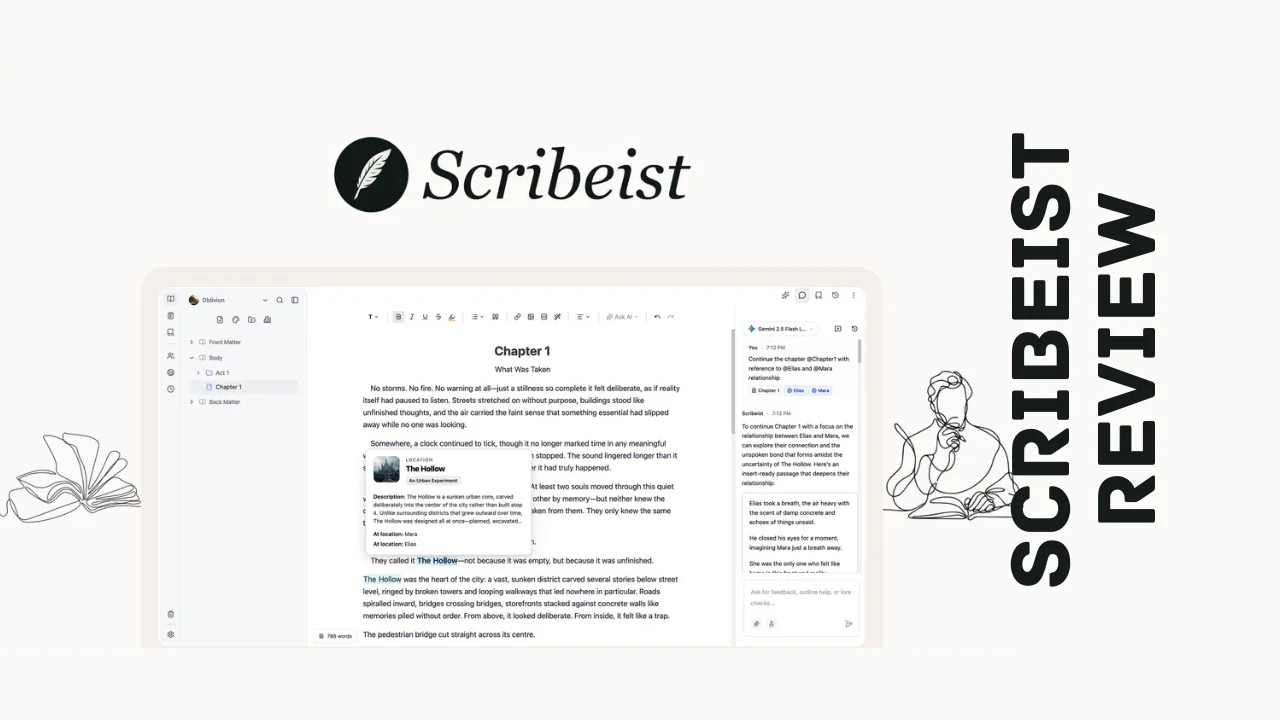
- Context-aware AI chat — Reference any character, note, or research source directly in the AI chat using @ mentions, so the AI is working with your actual project instead of generic prompts.
- Custom writing style profiles — Feed the AI a sample of your own writing to build a reusable style profile that keeps every AI-generated draft sounding like you, not like a generic chatbot.
- Long-form AI drafting — Generate drafts up to 4,000 words in your own tone, then refine them instantly with AI editing tools built into the enhanced editor.
- Mythos character and world tracking — Hover over any character name in your manuscript to instantly pull up their background, status, current location, and who they’re with, without breaking your writing flow.
- Relationship mapping — Map out how characters, locations, and lore connect to each other so continuity errors don’t sneak into chapter twenty after you forgot a detail from chapter three.
- Built-in SEO scoring — Track keyword density, meta descriptions, and an overall SEO score as you write blog content, so posts are ready to rank before you hit publish.
- On-page optimization tools — Fine-tune slugs, titles, and content length directly inside the editor with live scoring feedback instead of switching to a separate SEO plugin.
- Direct publishing integrations — Push finished content straight to WordPress, Ghost, Dev.to, Hashnode, Beehiiv, and HubSpot without copying and pasting into another platform.
- Multi-language support — Write and get AI assistance in over two dozen languages, with each workspace able to run in a different language if you manage multilingual content.
- Flexible imports — Bring in existing manuscripts and notes, including direct imports from tools like Notion and Novelcrafter, with control over how files get split into chapters, scenes, or separate documents.
For anyone comparing Scribeist features against a plain document editor, the real value is that AI here isn’t a bolted-on chat window — it actually understands your project’s context.
Ease of Use & User Experience
One thing worth noting early in this Scribeist review: setting up the platform is refreshingly simple. You pick a workspace type when you start a project, and the interface adjusts itself around that choice instead of dumping every tool on you at once. Novelists get outline and Mythos tracking front and center, while bloggers get SEO scoring and publishing options surfaced right where they’re writing. That kind of purpose-built onboarding cuts down on the “where do I even start” feeling that a lot of all-in-one writing tools create.
The dashboard itself uses color-coded folders to keep multiple projects organized, which matters a lot if you’re running several blogs or juggling more than one manuscript at a time. Switching between outline, editor, and canvas views happens without leaving the workspace, so you’re not exporting files or losing formatting every time you want a different perspective on your draft.
The AI chat feature deserves a specific mention here. Being able to @ mention a character or research note directly inside the chat means you’re not re-explaining your story’s backstory every time you want the AI’s help — it already knows. That’s a genuinely different experience from pasting context into a generic AI chatbot every single session. The interface works across desktop and browser, and recent updates have added HTML exports and equation rendering, which shows the team is actively building based on how people are actually using it day to day.
Scribeist Pricing Breakdown
This is where Scribeist pricing gets genuinely appealing for anyone who’s tired of stacking up monthly software subscriptions. Instead of a recurring fee, the platform is currently available as a one-time payment for lifetime access, which is a meaningful difference if you’re trying to keep your tool budget under control long term.
Here’s how the current Scribeist lifetime deal tiers break down:
| Plan | One-Time Price | Regular Value | Monthly Credits | SEO Site Connections | Core Features Included |
|---|---|---|---|---|---|
| Hobby (Tier 1) | $49 | $120 | 1,000 | 1 site, 200 indexed pages | Writing analytics, Canvas, BYOK, exports, WordPress/Ghost integration, planning sheets, blog generation, AI editor tools, Mythos tracking, writing styles, research, chat |
| Pro (Tier 2) | $99 | $216 | 2,500 | 3 sites, 2,000 indexed pages | Same full feature set as Tier 1, with higher usage limits |
| Pro (Tier 3) | $169 | $440 | 5,000 | 3 sites, 2,000 indexed pages | Same full feature set, with the highest monthly credit allowance |
A few things worth calling out on pricing:
- It’s a one-time payment, not a recurring subscription, so you pay once and keep lifetime access instead of watching a monthly charge show up indefinitely.
- Every tier unlocks the full feature set — Canvas, Mythos tracking, writing style profiles, SEO scoring, publishing integrations, and workspace imports are all included even on the entry-level plan. The tiers scale on usage (monthly credits and SEO site connections), not on locking away core functionality.
- BYOK support means you can bring your own AI provider key if you want more control over your AI usage and costs beyond the included monthly credits.
- There’s a 60-day refund window, so you can test it against your actual writing workflow before fully committing.
- You need to activate your license within 60 days of purchase, and you can upgrade tiers while the offer is live, though downgrading is only available within that same 60-day window.
For solopreneurs and small teams looking for one of the more affordable software picks in the AI writing space, the entry-level Hobby tier alone covers a genuinely useful monthly credit allowance without asking you to sacrifice any core features.
Pros and Cons
| Pros | Cons |
|---|---|
| One-time payment instead of a recurring monthly subscription | Newer, bootstrapped company with a smaller track record than legacy writing tools |
| Full feature set available even on the entry-level tier | Monthly credit limits mean heavy AI users may need a higher tier |
| Purpose-built workspaces for novels, blogs, and general writing | Multi-language support is still described as experimental |
| Mythos tracking solves a real pain point for long-form fiction writers | Fewer third-party integrations compared to more established platforms |
| Built-in SEO scoring removes the need for a separate plugin | Small team size could mean slower feature rollout at scale |
| 60-day refund window reduces the risk of trying it | BYOK setup adds an extra step for users unfamiliar with API keys |
Who Should Use Scribeist?
This section of the Scribeist review is about helping you decide if you’re the right fit for what this tool actually does well.
Novelists and fiction writers juggling large casts of characters, multiple locations, and layered lore will get the most obvious value from Mythos tracking and relationship mapping — features most general-purpose writing apps simply don’t offer.
Bloggers and content marketers who need to hit SEO targets without switching to a separate plugin or tool will appreciate having keyword density, meta descriptions, and live scoring built directly into the drafting process.
Small business owners and solopreneurs writing their own website copy, blog content, and email campaigns will find this to be one of the more practical productivity tools for entrepreneurs, especially with the one-time pricing keeping monthly overhead low.
Content creators managing multiple platforms will benefit from the direct publishing integrations with WordPress, Ghost, Dev.to, Hashnode, Beehiiv, and HubSpot, which cuts out a lot of manual copy-pasting between tools.
If you’re looking for a heavyweight team collaboration platform with deep workflow automation and enterprise-grade permissions, Scribeist’s current feature set is more focused on individual and small-team writing than large-scale collaborative publishing operations.
Scribeist vs. Alternatives
Scribeist positions itself as an alternative to Notion and Scrivener, two tools that dominate very different corners of the writing world, so it’s worth seeing how they actually compare.
| Feature | Scribeist | Notion | Scrivener |
|---|---|---|---|
| Primary focus | Purpose-built AI writing workspaces | General productivity and notes | Long-form fiction and manuscript organization |
| Pricing model | One-time lifetime payment | Monthly/annual subscription (free tier available) | One-time purchase, no built-in AI |
| Built-in AI writing assistance | Yes, context-aware across the project | Limited, add-on style AI features | No native AI |
| Character and world tracking | Yes, via Mythos | No | Manual, via corkboard and notes |
| Built-in SEO scoring | Yes | No | No |
| Direct publishing integrations | Yes, multiple platforms | Limited | No |
| Best for | Novelists, bloggers, and content creators who want AI plus structure | Teams needing flexible all-purpose workspaces | Novelists who prefer a manual, distraction-free writing environment |
The honest takeaway here: Notion is more flexible for general project and team management, and Scrivener remains a favorite for writers who want total manual control without AI involved at all. But if you want dedicated fiction tools, built-in SEO scoring, and AI that actually understands your project’s context, Scribeist is doing something neither of those tools was designed to do — and it’s doing it with one-time pricing instead of ongoing subscription costs. For anyone actively comparing Scribeist alternatives, that combination of purpose-built workspaces and lifetime access is hard to find elsewhere.
User Feedback Summary
As a newer platform, Scribeist doesn’t yet have a massive review footprint across major software review sites, but the early sentiment available sits at a strong 4.5 out of 5. Users consistently point to the Mythos character tracking and the context-aware AI chat as standout features that solve problems other writing tools simply ignore.
The founder has also been notably active in responding to user feedback, regularly shipping updates based directly on what the community requests — recent examples include expanded language support, more flexible file imports, and direct imports from other writing tools. That kind of visible responsiveness tends to build trust quickly, even for a young product. The most common critique so far centers on the experimental nature of multi-language support and a desire for deeper integrations, which is a fair ask as the platform continues to mature. Overall, the early signal points to a tool that’s actively listening to the people using it.
Frequently Asked Questions
What is Scribeist and what does it do?
Scribeist is an AI-powered writing platform offering dedicated workspaces for novels, blogs, and general writing. Each workspace includes AI that understands your full project context, plus specialized tools like character tracking, SEO scoring, and direct publishing integrations, so writers don’t have to juggle multiple separate apps.
How much does Scribeist cost?
Scribeist pricing starts with a one-time payment for the entry-level Hobby plan, with two higher Pro tiers unlocking more monthly AI credits and additional SEO site connections. Every tier includes the full feature set, including Mythos tracking, Canvas, and publishing integrations, so you’re paying for usage limits, not locked features.
Is there a Scribeist lifetime deal available?
Yes, Scribeist currently offers lifetime access across three one-time payment tiers instead of a recurring monthly subscription. Each tier increases your monthly AI credit allowance and the number of SEO-connected sites, while keeping the same full set of writing, tracking, and publishing tools available from the entry-level plan up.
What are the main Scribeist features?
Core Scribeist features include dedicated Novel, Blog, and General workspaces, context-aware AI chat with @ mentions, custom writing style profiles, Mythos character and world tracking, built-in SEO scoring, and direct publishing to platforms like WordPress, Ghost, and HubSpot without leaving the app.
Is Scribeist good for bloggers and content creators?
Yes, Scribeist is well suited to bloggers and content creators thanks to built-in SEO scoring, keyword density tracking, and direct publishing integrations with WordPress, Ghost, Dev.to, Hashnode, Beehiiv, and HubSpot. It’s one of the more practical productivity tools for entrepreneurs who write and publish content regularly.
What are the best Scribeist alternatives?
The closest Scribeist alternatives are Notion and Scrivener. Notion offers more general-purpose flexibility for teams, while Scrivener is a long-standing favorite for manual, AI-free novel writing. Scribeist stands apart by combining purpose-built fiction and blogging tools with context-aware AI in a single one-time-payment platform.
Does Scribeist offer a refund or free trial?
Yes, Scribeist includes a 60-day refund window from the date of purchase, giving you time to test it against your actual writing workflow. Licenses need to be activated within that same 60-day period, so it’s best to set up your workspace soon after purchasing rather than letting it sit unused.
Can Scribeist publish directly to WordPress and Ghost?
Yes, Scribeist supports direct publishing to WordPress, Ghost, Dev.to, Hashnode, Beehiiv, and HubSpot right from the editor. This means bloggers and content marketers can draft, optimize for SEO, and publish finished posts without exporting files or copying content into a separate platform.
Final Verdict
Wrapping up this Scribeist review, my honest take is that this tool earns its place for a specific, well-defined group of writers rather than trying to be everything to everyone — and that focus is exactly what makes it work. If you write fiction and have ever lost track of a character’s eye color by chapter fifteen, Mythos alone justifies a serious look. If you blog or produce content marketing regularly, having SEO scoring built directly into the drafting process instead of bolted on as a separate plugin is a genuine time-saver.
The one-time pricing model makes this one of the more appealing entries among best tools for small business owners and independent writers who are tired of stacking up monthly subscriptions for tools they use every single day. Every tier includes the full feature set, so you’re not being nickel-and-dimed for core functionality as you scale up, and the 60-day refund window makes trying it low-risk. It’s not the right pick if you need heavyweight team collaboration or enterprise workflow tools, but for solo writers, bloggers, and small content teams who want AI that actually understands their project instead of starting from zero every session, Scribeist delivers real, practical value.