Most no-code website builders make you choose between two bad options: something so basic it can’t handle a real project, or something so bloated it takes a developer to actually finish anything. This Divhunt review exists because a growing number of designers, agencies, and small business owners are asking whether this platform actually solves that trade-off, or if it’s just another builder promising “no limits” and quietly delivering plenty of them.
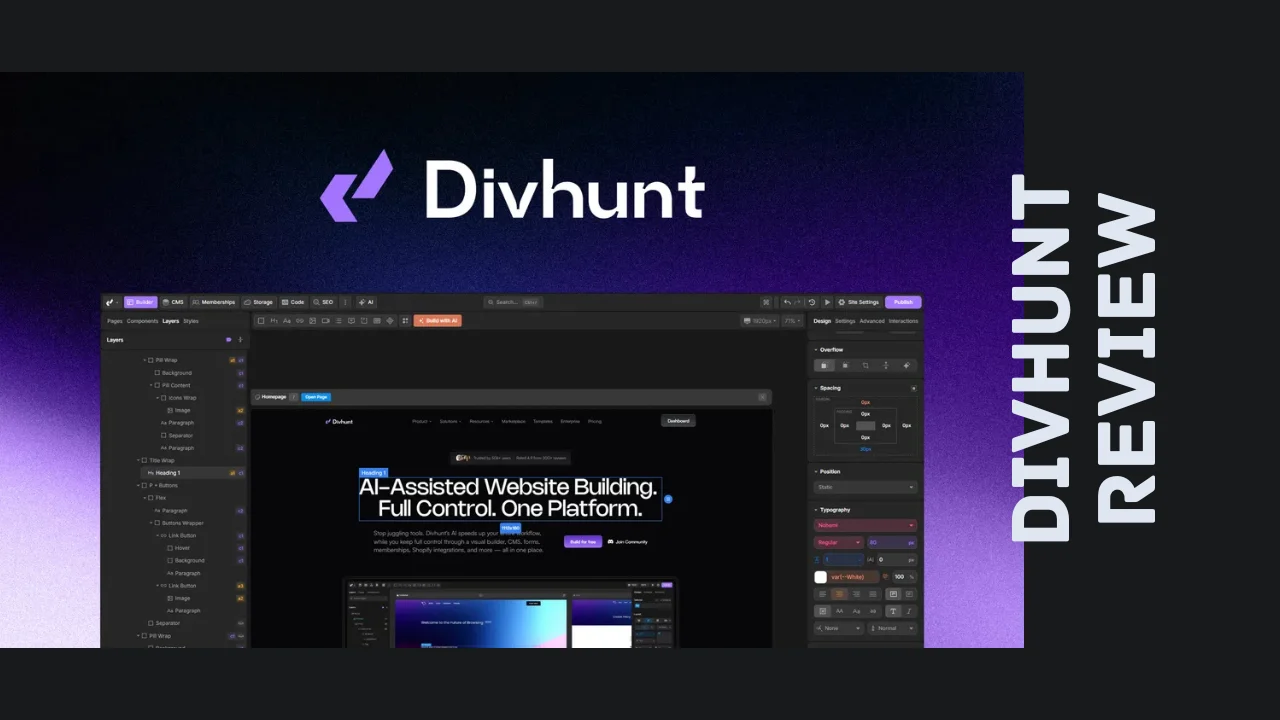
Divhunt is a visual, code-free website builder that lets you design fast, unlimited websites using a freeform canvas, then extend them with plugins, custom code, and a real CMS instead of hitting a wall the moment your project gets complex. It’s built for developers who want speed without giving up control, marketing and web design agencies juggling multiple client sites, and small business owners or solopreneurs who need a professional website without hiring a dev team. If you’ve outgrown a basic drag-and-drop builder or gotten frustrated fighting Webflow’s learning curve, this is worth a real look.
Overview of Divhunt
Divhunt has been around since 2020, built out of Switzerland by a small, founder-led team of designers and developers who set out to fix what they saw as the core problem with most no-code tools: you either get speed or you get power, rarely both. The mission from day one was to build a genuinely unlimited platform — unlimited pages, unlimited collaborators, and every feature available on every plan, rather than gating core functionality behind expensive tiers.
Since its original launch, the platform has gone through a serious transformation. What started as a solid visual builder has been rebuilt with AI woven directly into the workflow, plus new additions like memberships with Stripe payments, a Shopify integration, an advanced form builder, and a dedicated SEO manager. That’s a meaningful jump from a “nice website builder” to a genuine all-in-one platform for running real websites and small online businesses.
The target audience spans a few clear groups: developers who want visual speed without losing the ability to drop in custom code, marketing and web design agencies managing several client projects at once, and small business owners or solopreneurs who need a fast, professional site without stitching together five different tools. Given how the pricing and feature set are structured, it’s also a genuinely strong fit for anyone actively hunting for affordable software that doesn’t cut corners on capability.
Key Features of Divhunt
Here’s a breakdown of what you actually get inside the platform, organized by what each Divhunt feature is built to solve:
- Visual, code-free canvas — Build any website you can imagine using a freeform, drag-and-drop canvas, with optional custom CSS available when you want extra precision.
- Unlimited fast-loading pages — Create as many static pages as you need without performance slowdowns, since the platform runs on single-page application technology under the hood.
- Instant page transitions — Once your site loads initially, every other page loads instantly for visitors, giving you a near-zero refresh experience that feels more like an app than a traditional website.
- Live preview and real-time collaboration — Preview changes in a separate tab before pushing them live, and invite unlimited collaborators to work on the same project simultaneously while seeing everyone’s activity in real time.
- Built-in CMS — Manage dynamic content with a real content management system that supports bulk editing, advanced filtering, galleries, and flexible data binding.
- AI-assisted building — Generate full pages or sections from a text prompt or a screenshot, edit individual elements using an AI assistant, and translate your entire site into multiple languages in minutes.
- Bring your own AI key — Connect your own Claude, GPT, Gemini, or OpenRouter key so you pay your AI provider directly, with no markup and no credit system to manage.
- Plugins and custom code — Extend your site with 50-plus free native plugins, third-party integrations, or your own custom code, and even build and sell your own plugins or templates on the built-in marketplace.
- Memberships and payments — Gate content behind a login, accept payments through Stripe, and price individual courses or products directly inside the platform.
- Shopify integration — Run your store through Shopify while building the rest of your site and brand experience in Divhunt.
- Advanced form builder — Create drag-and-drop, multi-step forms with conditional logic that connect directly to your CMS, no separate form tool required.
- SEO Manager — Control every SEO setting from one place, including support for llms.txt so AI crawlers can properly index and understand your site.
- REST API access — Connect any REST API visually without writing code, useful for syncing external data sources into your site.
- Localization support — Build multilingual sites that serve visitors in their own language without maintaining separate site versions.
Between the AI tooling, the CMS, and the plugin ecosystem, this list covers most of what agencies and growing businesses actually need — which is exactly the gap this Divhunt review set out to check.
Ease of Use & User Experience
Divhunt’s setup process gets you into the builder fast, and the freeform canvas is genuinely one of its strongest usability features. Instead of being locked into a rigid grid system, you can build in whatever layout style fits how you actually think through a design, which developers and designers coming from more restrictive tools tend to appreciate quickly.
The dashboard keeps project settings, branding, and SEO controls centralized, which matters if you’re managing more than one site at a time. Live preview lets you check changes in a separate tab before anything goes live, and the real-time collaboration features mean a whole team can work inside the same project without stepping on each other’s changes — a genuinely useful feature for agencies running multiple people on one build.
That said, this isn’t the simplest builder on the market for a total beginner. Because Divhunt gives you this much control — custom CSS, a real CMS, REST API connections, plugin management — there’s a legitimate learning curve if you’ve never worked with a more advanced site builder before. Most users report getting comfortable within their first project, and the AI-assisted generation tools introduced in the recent rebuild help flatten that curve significantly by letting you generate a working starting point from a prompt or screenshot instead of building everything from a blank canvas. The interface runs in-browser and works well on desktop; like most serious website builders, the actual building experience is best done on a larger screen rather than a phone.
Divhunt Pricing Breakdown
This is where Divhunt pricing gets genuinely interesting compared to subscription-based builders like Webflow. Instead of paying monthly per site, Divhunt is available as a one-time payment structured around stackable “codes,” where each code adds a fixed set of usage limits to your account.
Here’s how the current Divhunt lifetime deal tiers break down:
| Plan | One-Time Price | Regular Value | Websites | Bandwidth | CMS Items | Monthly Form Submits | CDN Storage |
|---|---|---|---|---|---|---|---|
| 1 Code | $69 | $180 | 1 | 100 GB | 2,000 | 2,000 | 2 GB |
| 2 Codes | $138 | $360 | 2 | 200 GB | 4,000 | 4,000 | 4 GB |
| 3 Codes | $207 | $540 | 3 | 300 GB | 6,000 | 6,000 | 6 GB |
| 4 Codes | $276 | $720 | 4 | 400 GB | 8,000 | 8,000 | 8 GB |
| 5 Codes | $345 | $900 | 5 | 500 GB | 10,000 | 10,000 | 10 GB |
| 6-10 Codes | $414 – $690 | $1,080 – $1,800 | 6-10 | 600-1,000 GB | 12,000-20,000 | 12,000-20,000 | 12-20 GB |
A few things worth calling out on pricing:
- It’s a one-time payment, not a monthly subscription, and every code you buy is stackable, meaning you can keep adding capacity as your needs grow instead of jumping to a completely different pricing tier.
- Every plan includes the full feature set — unlimited pages, unlimited collaborators, unlimited CMS fields, live collaboration, built-in SEO, the REST API, all available plugins, localization, workflows, code export, and integrations are all included from the very first code. What scales with more codes is usage capacity (websites, bandwidth, CMS items, form submits, and storage), not locked-away functionality.
- Codes can be combined within one account or split across separate accounts, giving agencies flexibility in how they manage client projects.
- There’s a 60-day refund window, so you can build a real project and test performance before fully committing.
- You need to redeem your code within 60 days of purchase, so don’t let it sit unused after buying.
For agencies and small businesses comparing Divhunt pricing against ongoing subscriptions from other builders, the fact that every tier ships with the complete feature set is a genuinely rare structure in this space, and it’s a big part of what makes this one of the more affordable software options for anyone building more than a single basic site.
Pros and Cons
| Pros | Cons |
|---|---|
| One-time, stackable pricing instead of a recurring monthly subscription | Learning curve for users completely new to advanced site builders |
| Full feature set included on every tier, no locked functionality | Template library is smaller than more established builders like Webflow |
| Genuinely fast page loads thanks to single-page application architecture | Small team size (1-10 people) could mean slower feature rollout at scale |
| AI-assisted page generation now built directly into the workflow | AI features require connecting your own provider key, which adds a setup step |
| Real-time collaboration with unlimited team members on every plan | Best suited to desktop use rather than mobile-first editing |
| Strong, consistent user ratings and responsive founder support | Being a smaller company, third-party integration count is more limited than giants like Webflow |
Who Should Use Divhunt?
This section of the Divhunt review is about matching the tool to the right kind of user, because it genuinely shines for some workflows more than others.
Developers who want the speed of a visual builder without losing the ability to write custom code, connect REST APIs, or export code when needed will find Divhunt strikes a rare balance most no-code tools don’t offer.
Web design and marketing agencies managing multiple client sites will benefit heavily from stackable pricing, unlimited collaborators on every tier, and centralized project settings that keep branding consistent across accounts.
Small business owners and solopreneurs looking for one of the more practical productivity tools for entrepreneurs will appreciate that a single one-time payment covers a fully-featured website, membership gating, and Stripe payments without a recurring bill.
Content creators and course sellers will get real value from the membership and payment tools, which let you gate content and sell courses or products directly without bolting on a separate platform.
If you’re looking for a massive template marketplace and the biggest possible third-party app ecosystem, more established builders like Webflow still have the edge — Divhunt trades some of that breadth for a leaner, faster, more unified building experience.
Divhunt vs. Alternatives
Divhunt is often compared to Webflow and WordPress, two of the most recognizable names in website building, so it’s worth putting them side by side.
| Feature | Divhunt | Webflow | WordPress |
|---|---|---|---|
| Pricing model | One-time, stackable lifetime payment | Recurring monthly/annual subscription | Free core software, paid hosting and plugins add up |
| Learning curve | Moderate, eased by AI generation tools | Moderate to steep | Low to start, steep for advanced customization |
| Built-in AI page generation | Yes, from prompts or screenshots | Limited native AI features | Requires third-party plugins |
| Real-time team collaboration | Yes, unlimited on every plan | Yes, tied to plan tier | Requires third-party tools |
| Built-in CMS | Yes | Yes | Yes, core strength of the platform |
| Membership and payments | Built-in with Stripe | Requires add-ons | Requires plugins |
| Template library size | Smaller, growing marketplace | Large, mature library | Massive, largest in the industry |
| Best for | Speed, unified tooling, one-time cost | Design-heavy agency projects | Content-heavy sites and blogs needing maximum plugin flexibility |
The honest takeaway: WordPress still wins on sheer plugin variety and community size, and Webflow remains a strong pick for agencies that want the deepest design customization and don’t mind a recurring bill. But if you want a faster build process, real AI assistance baked in, and a genuinely unified platform without stacking monthly subscriptions, Divhunt is a serious contender. For anyone actively weighing Divhunt alternatives, the one-time pricing alone is enough to warrant a closer look before committing to a subscription-based builder.
User Feedback Summary
Divhunt has built up a genuinely strong reputation, sitting at roughly 4.8 out of 5 stars across a substantial base of user reviews — a meaningfully larger sample size than most newer software tools in this space. The consistent themes in user feedback are an intuitive interface, fast page load times, and responsive support from the founding team.
The most common criticism centers on the learning curve for users new to more advanced builders, along with a template library that’s still growing compared to long-established competitors. Several users have also noted that the founder and team are actively engaged, regularly shipping updates based directly on user requests — the recent addition of AI tools, memberships, and Shopify integration all trace back to community feedback. For a tool built by a small team, that level of responsiveness is a genuinely good sign for long-term reliability.
Frequently Asked Questions
What is Divhunt and what does it do?
Divhunt is a no-code, visual website builder that lets you design fast, unlimited websites using a freeform canvas. It includes a built-in CMS, AI-assisted page generation, membership and payment tools, plugin support, and REST API connections, all without requiring you to write code.
How much does Divhunt cost?
Divhunt pricing works through stackable, one-time payment codes rather than a monthly subscription. Each code adds usage capacity, including additional websites, bandwidth, CMS items, and form submissions, while every tier includes the same full feature set from the very first code you purchase.
Is there a Divhunt lifetime deal available?
Yes, Divhunt currently offers lifetime access through stackable one-time payment codes instead of a recurring subscription. You can purchase multiple codes to scale up bandwidth, websites, CMS capacity, and storage, and combine them within one account or split them across separate accounts as needed.
What are the main Divhunt features?
Core Divhunt features include a visual drag-and-drop canvas, a built-in CMS, AI-assisted page generation from prompts or screenshots, real-time team collaboration, a Shopify integration, membership and Stripe payment tools, an advanced form builder, and a dedicated SEO manager for full on-page control.
Is Divhunt good for small businesses and agencies?
Yes, Divhunt is well suited to small businesses and agencies thanks to its one-time stackable pricing, unlimited collaborators on every tier, and centralized project management for multiple sites. It’s a strong pick among best tools for small business owners who want a professional site without recurring software costs.
What are the best Divhunt alternatives?
The closest Divhunt alternatives are Webflow and WordPress. Webflow offers deeper design customization with a larger template library but requires an ongoing subscription, while WordPress has the largest plugin ecosystem but a steeper learning curve for advanced customization. Divhunt stands out with one-time pricing and built-in AI tools.
Does Divhunt offer a refund or free trial?
Yes, Divhunt includes a 60-day refund window from the date of purchase, giving you time to build a real project and test performance before fully committing. Purchased codes need to be redeemed within that same 60-day window, so it’s best to activate your account soon after buying.
Can Divhunt handle ecommerce and membership sites?
Yes, Divhunt supports ecommerce through a built-in Shopify integration and handles memberships natively, including gated content and Stripe-powered payments for courses or products. This means you can run a membership site or connect an online store without adding separate third-party tools to your stack.
Final Verdict
Wrapping up this Divhunt review, my honest take is that this platform has genuinely earned the strong reputation it’s built. It solves the exact trade-off most no-code builders force you into — you get real speed and a genuinely visual workflow without losing the technical depth that developers and agencies actually need. The addition of AI-assisted page generation, memberships, Shopify integration, and a dedicated SEO manager turns this from a solid website builder into something closer to a full small-business operating platform.
The pricing structure alone makes it one of the more compelling entries among best tools for small business owners and agencies who are tired of recurring monthly bills for every tool in their stack. A one-time, stackable payment that includes the full feature set from day one is a rare structure in this space, and the 60-day refund window makes trying it a low-risk decision. It’s not the pick if you specifically need the largest possible template library or the deepest third-party app ecosystem — WordPress and Webflow still lead there. But for developers, agencies, and small business owners who want speed, real AI assistance, and genuine long-term value without a subscription eating into monthly overhead, Divhunt delivers.