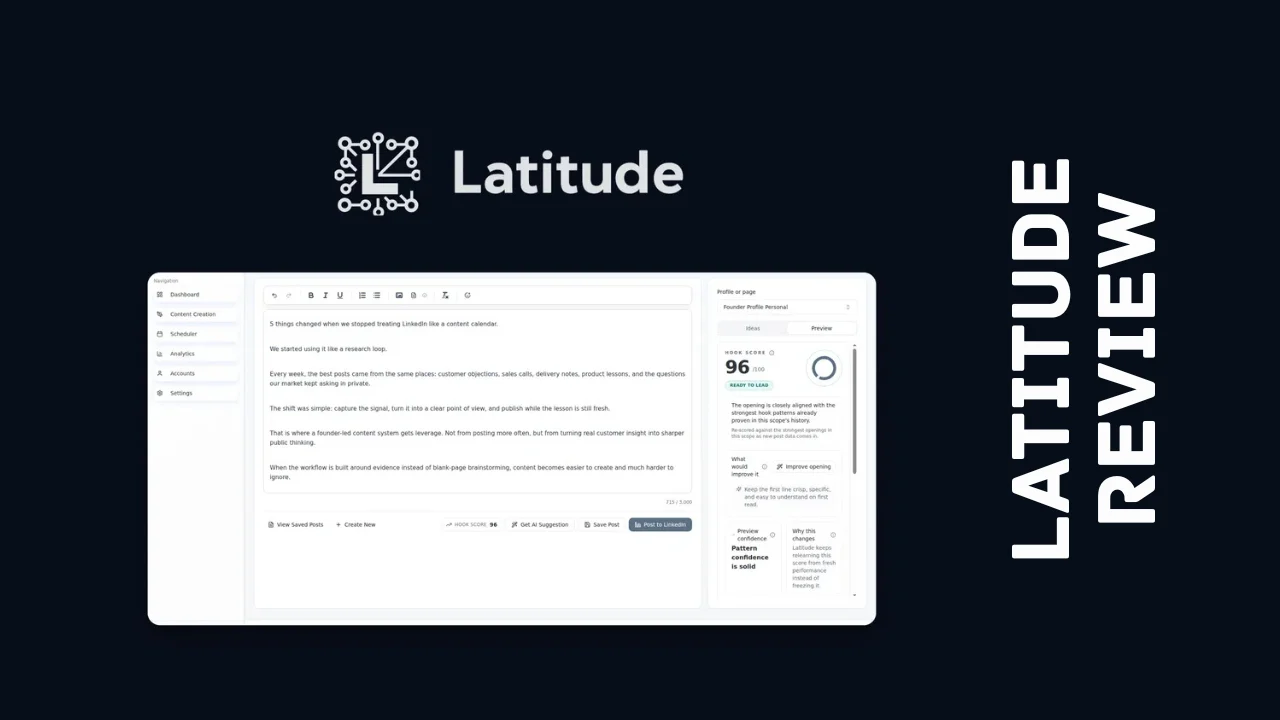
Posting consistently on LinkedIn is supposed to build your pipeline, but most founders and marketers know the real cycle: you post a burst of content for two weeks, get inconsistent results, lose motivation, and go quiet for a month. This Latitude review looks at a tool built specifically to break that pattern — an AI content system that drafts in your voice, scores your hook before you publish, and shows you exactly which topics are actually working.
Latitude is built for founders, marketers, and job seekers who know LinkedIn matters for their business or career but don’t have hours to spend guessing what to post or staring at a blank draft. Instead of a generic AI writer that sounds nothing like you, or a general social scheduler that treats LinkedIn like an afterthought, Latitude is built around one platform and one goal: consistent, authentic posting that actually turns into pipeline.
This review covers what Latitude actually does, how the pricing breaks down, what it’s like to use day-to-day, and how it stacks up against general-purpose schedulers like Buffer and SocialBee.
Overview of Latitude
Latitude launched in September 2025, built by founder and CEO Brian Martynowicz, who started the company after living the exact problem it solves. As a founder trying to build trust with buyers, he knew consistent LinkedIn activity mattered, but every post took too long to write and the results felt like a coin flip. He’d post in bursts, go quiet for weeks, and have no real sense of why one post landed while the next one didn’t.
That frustration became the mission behind Latitude: build a tool that pulls the topics your network actually cares about, drafts content in your own voice, schedules it for when your audience is online, and shows you what’s working so you can do more of it. It’s a small, bootstrapped team based in Massachusetts, and the product is still actively evolving based on direct user feedback, including a recently added feature that lets you import your existing LinkedIn post history so the AI can learn your voice and pull in historical performance data.
The target audience is squarely founders, marketers, consultants, and job seekers who rely on LinkedIn for visibility, credibility, or pipeline, and who want a focused tool built around that one platform rather than a general scheduler that treats it as just another checkbox.
Key Features
Latitude’s feature set is narrower than a typical social media scheduler, and that focus is intentional. Here’s what stands out among Latitude’s features:
- Focused post editor with formatting, media support, and a LinkedIn-style preview so you see exactly what your post will look like before it publishes
- Voice calibration, which tunes the AI’s drafting to match your specific tone and writing style rather than producing generic AI-sounding copy
- AI-generated post ideas, pulled from your stated goals and audience so you’re never staring at a blank page
- Hook scoring, which benchmarks your opening line against similar LinkedIn profiles so you know how likely it is to land before you post
- AI rewrite suggestions, sharpening your hook’s tone and specificity when the scoring flags room for improvement
- Suggested content angles, offered automatically when your original direction isn’t gaining traction
- Performance analytics, tracking impressions, reach, reactions, comments, and engagement rate by account and date range
- Post-level performance review, helping you spot which topics are actually working so you can double down on them
- Smart scheduling, auto-placing approved drafts at optimal posting windows or letting you drag them onto a calendar manually
- Monthly publishing calendar, giving you a full view of your queue so gaps in your posting schedule are obvious at a glance
- LinkedIn post history import, letting Latitude learn your voice and analytics from posts you’ve already published, not just new ones
- No engagement bot behavior, meaning Latitude never touches your comments or DMs, keeping your account activity looking genuinely yours
That combination of drafting, scoring, scheduling, and analytics built specifically around LinkedIn is a meaningfully different approach than tools that treat the platform as one of many channels to check off.
Ease of Use & User Experience
Onboarding is fast by design. According to the team, getting set up, including account creation and generating your initial content strategy, takes about two minutes. You connect your LinkedIn account, answer a few questions about your goals and audience, and Latitude builds a starting content strategy you can refine from there.
The core workflow revolves around a focused editor rather than a crowded dashboard trying to manage a dozen platforms at once. Because Latitude only works with LinkedIn, the interface stays simpler than a general scheduler juggling multiple networks, previews, and posting rules. The hook-scoring feature is a nice touch during drafting, giving you a quick signal on whether your opening line is likely to perform before you commit to publishing it.
The calendar view makes it easy to spot gaps in your posting schedule, and the analytics dashboard keeps performance data in one place instead of forcing you to check LinkedIn’s native analytics separately. Because Latitude is a young platform, the interface is still evolving quickly, with new features like the post-history import having shipped just weeks after launch based on user requests. That’s a good sign for long-term product direction, though it also means the experience may shift as the platform matures. Latitude works through a web dashboard rather than a dedicated mobile app, so most of the drafting and scheduling work happens at a desktop.
Latitude Pricing Breakdown
Latitude is available as a one-time payment for lifetime access rather than the recurring monthly subscription you’d pay for most social media tools. That structure is a big part of what makes this Latitude review worth reading before you commit, since a single upfront payment can save real money compared to paying a monthly fee indefinitely for a comparable scheduling and content tool.
All three tiers include the full core toolkit: unlimited post creation and ideation, post performance analytics, ideation tooling, custom content strategy, the AI drafting hub, voice calibration, performance reporting, multi-language support, and access to LinkedIn company accounts. What changes between tiers is how many LinkedIn accounts you can connect and how many posts you can publish each month.
| What’s Included | Tier 1 | Tier 2 | Tier 3 |
|---|---|---|---|
| Price | $69 (regular $420) | $149 (regular $630) | $349 (regular $990) |
| Access | Lifetime access | Lifetime access | Lifetime access |
| Connected LinkedIn accounts | 1 | 3 | 5 |
| Published posts monthly | 15 | 45 | 75 |
| Post creation & ideation | Unlimited | Unlimited | Unlimited |
| Voice calibration & AI drafting hub | Included | Included | Included |
| Performance analytics & reporting | Included | Included | Included |
| Team management | Included | Included | Included |
| Refund window | 60 days | 60 days | 60 days |
Every tier is backed by a 60-day refund window, giving you enough time to actually draft, schedule, and publish real posts before deciding whether it fits your workflow. There isn’t a separate free trial beyond that guarantee, but since it’s a one-time purchase, the refund period effectively works as a full trial without a subscription clock ticking in the background.
Worth noting: LinkedIn itself recommends posting two to three times a week for consistent visibility, and even Tier 1’s 15 posts a month comfortably covers that recommended pace for a single account. Solo founders and job seekers will likely find Tier 1 sufficient, while marketers managing multiple executives’ profiles or agencies posting on behalf of clients will want Tier 2 or Tier 3 for the extra connected accounts. Compared to what you’d pay monthly for a general scheduler with LinkedIn-specific AI features bolted on, Latitude pricing as a one-time payment stands out as one of the more affordable software options for anyone planning to post consistently for years, not just months.
Pros and Cons
| Pros | Cons |
|---|---|
| One-time lifetime payment instead of a recurring subscription | LinkedIn only, no support for other social platforms |
| Voice calibration keeps AI drafts sounding genuinely like you | Posts-per-month limits on lower tiers require planning around |
| Hook scoring gives real feedback before you publish, not after | Very new platform with a small, still-growing review base |
| Never touches comments or DMs, so your account stays authentic | Web-based only, no dedicated mobile app for on-the-go editing |
| Post history import lets the AI learn from what you’ve already written | Multiple connected accounts require a higher-priced tier |
| Fast onboarding, roughly two minutes to a working content strategy | Feature set is still evolving as a young, actively developing product |
| 60-day refund window on every tier | Smaller team means slower support response than larger competitors |
Who Should Use It?
Latitude is a strong fit if you recognize your situation in any of these groups:
- Startup founders who know LinkedIn visibility matters for fundraising, hiring, or sales but don’t have hours to spend on content strategy
- Marketers and consultants managing their own or a client’s LinkedIn presence and wanting AI drafts that don’t sound generic
- Job seekers trying to build visibility and credibility on LinkedIn during a search, without guessing what to post
- Solopreneurs who know consistency drives results but struggle to stick with a posting schedule on their own
- Small teams and agencies managing multiple executives’ or clients’ LinkedIn accounts who need a focused tool built around that single platform
It’s less of a fit if you’re managing content across Instagram, X, and Facebook alongside LinkedIn and want one dashboard for everything, since Latitude is deliberately built around LinkedIn alone. But for anyone whose main growth channel is LinkedIn specifically, it stands out as one of the more purpose-built productivity tools for entrepreneurs trying to turn consistent posting into an actual pipeline, not just noise.
Comparison With Competitors
| Feature | Latitude | Buffer | SocialBee |
|---|---|---|---|
| Pricing model | One-time lifetime payment | Monthly subscription (~$6/channel) | Monthly subscription ($29–$449/mo) |
| Platform focus | LinkedIn only | Multi-platform (11+ networks) | Multi-platform (10 networks) |
| AI voice calibration | Yes | No | Limited (AI captions only) |
| Hook scoring before publishing | Yes | No | No |
| LinkedIn-specific analytics depth | Deep | Basic | Basic |
| Content recycling/categorization | No | No | Yes |
| Best for | Founders focused specifically on LinkedIn growth | Broad multi-platform scheduling | Multi-platform content recycling |
Buffer and SocialBee are both solid, established schedulers if you’re managing several social platforms at once, and both offer clean interfaces at reasonable monthly prices. But neither is built specifically around LinkedIn, and neither offers anything like hook scoring or voice calibration tuned to a single platform’s audience behavior. If you’re weighing Latitude alternatives, the honest takeaway is that Buffer or SocialBee make more sense if LinkedIn is just one of several channels you post to, while Latitude’s depth and one-time pricing make it the stronger choice specifically for founders and marketers whose growth strategy centers on LinkedIn.
User Feedback Summary
Because Latitude only launched in September 2025, it doesn’t yet have the review volume you’d expect from an established scheduling tool across major software review platforms, and independent reviews on sites like G2, Capterra, or Trustpilot remain limited at this early stage. That’s worth being upfront about rather than treating a handful of early reviews as a definitive verdict.
What feedback does exist points toward a founder-led, responsive product. Users have specifically praised how quickly the team acts on requests, with the post-history import feature shipping within weeks of launch after being one of the most requested additions from early customers. That kind of visible responsiveness is a meaningful signal for a brand-new platform, even if the overall sample size is still small.
The realistic read here is that early sentiment is positive and the product is clearly improving fast, but anyone buying should treat it as an early-adopter opportunity on a genuinely promising tool rather than a platform with years of proven public reviews behind it.
Frequently Asked Questions
What is Latitude used for?
Latitude is an AI-powered content tool built specifically for LinkedIn, helping founders and marketers draft posts in their own voice, score their opening hook before publishing, schedule content for optimal times, and track which topics are actually driving engagement, all from one focused dashboard.
Is Latitude a one-time payment or a subscription?
Latitude is currently sold as a one-time lifetime payment across three pricing tiers, rather than a recurring monthly subscription. Each tier includes unlimited post creation and ideation, with connected LinkedIn accounts and monthly post limits increasing at higher tiers, backed by a 60-day refund window.
Does Latitude post or message people automatically?
No, Latitude deliberately avoids acting as an engagement bot. It drafts and schedules your posts based on your input and approval, but it never touches your comments or direct messages, which keeps your account activity looking authentically yours rather than automated.
How is Latitude different from Buffer or SocialBee?
Buffer and SocialBee are general-purpose schedulers built for managing multiple social platforms at once. Latitude is built specifically around LinkedIn, adding features like AI voice calibration and hook scoring that neither Buffer nor SocialBee offers, along with a one-time payment instead of a recurring subscription.
Can Latitude import my past LinkedIn posts?
Yes, Latitude recently added a feature that lets you import your existing LinkedIn post history and performance data. The AI uses your past posts as writing samples to better understand your voice, and it cross-references imported performance data with the LinkedIn API to keep your analytics accurate.
Is Latitude safe for my LinkedIn account?
Yes, based on how the platform is built, Latitude only drafts, schedules, and publishes content you’ve approved. It doesn’t automate connection requests, comments, or messages, which is generally the type of automation most likely to trigger account restrictions on LinkedIn.
Is Latitude good for small businesses and solopreneurs?
Latitude is built with solo founders and small teams specifically in mind, with an entry-level tier that comfortably covers LinkedIn’s recommended posting frequency for a single account. Combined with the one-time payment model, it’s one of the more affordable software options for entrepreneurs who want consistent LinkedIn visibility without a recurring bill.
Does Latitude offer a refund if it doesn’t work for me?
Yes, every Latitude pricing tier includes a 60-day refund window, giving you enough time to draft, schedule, and publish real posts before deciding whether the tool fits your workflow and posting habits.
Final Verdict
Wrapping up this Latitude review, the tool earns a solid recommendation for founders, marketers, and job seekers whose growth strategy genuinely depends on LinkedIn. The combination of voice-calibrated AI drafting, hook scoring before you publish, and analytics built specifically around LinkedIn engagement gives it a real edge over general-purpose schedulers that treat the platform as an afterthought.
It’s not without trade-offs. As a brand-new platform, it hasn’t built up years of public reviews yet, and its LinkedIn-only focus means it won’t replace a broader scheduler if you’re managing several platforms at once. But for the specific problem it was built to solve, consistent, authentic LinkedIn posting that actually turns into pipeline, Latitude delivers real value at a one-time price, and it’s well worth testing against your own posting habits before committing to a pricier, subscription-based alternative.