Manually copying numbers out of invoices, receipts, and purchase orders is the kind of task that never makes it onto anyone’s list of favorite work, yet it eats hours every week for businesses that deal with paperwork regularly. This DigiParser review looks at a tool built to eliminate that busywork entirely — an AI-powered document parser that turns invoices, POs, receipts, and other documents into clean, structured data without requiring templates or manual setup.
DigiParser is built for freelancers, small business owners, and SaaS founders who need accurate data extraction from documents but don’t have a developer team to build and maintain custom parsing rules. Instead of mapping fields by hand or relying on rigid templates that break the moment a vendor changes their invoice layout, DigiParser uses AI to read documents the way a person would and hands you back structured, export-ready data.
This review covers what DigiParser actually does, how the pricing breaks down, what day-to-day use feels like, and how it compares to established document processing tools like Nanonets and Docsumo.
Overview of DigiParser
DigiParser launched in January 2024 out of Indore, India, built by founder Pankaj Patidar and a small, bootstrapped team. The idea came from a familiar frustration: sifting through piles of invoices, contracts, and mixed PDFs by hand, or relying on template-based tools that needed constant maintenance every time a document format changed even slightly.
The mission behind DigiParser is to remove that manual burden entirely by using AI to automatically split, classify, and extract the fields that matter from any document, without requiring a template to be built first. You drop a folder, forward an email, or batch upload files, and clean, structured data comes out the other end, ready to export or push directly into the tools you already use.
The target audience is freelancers, small business owners, and SaaS or tool founders who process invoices, receipts, purchase orders, bank statements, or other recurring document types and need that data flowing into their accounting or business systems without manual re-entry.
Key Features
DigiParser’s feature set is built specifically around eliminating the setup and maintenance overhead that traditional document parsing tools require. Here’s what stands out among DigiParser’s features:
- Bulk document processing, letting you upload invoices, receipts, POs, and more in bulk and get back clean, structured rows of data
- No-template AI extraction, automatically detecting the schema and fields in a document rather than requiring you to map them manually first
- Custom parser builder, letting you define specific fields and tables for any document type, from vendor invoices to shipping manifests
- Pre-built templates, available for common document types like invoices, bank statements, and resumes, as a starting point you can refine further
- AI-assisted parser refinement, improving accuracy over time as new document variations come through your workflow
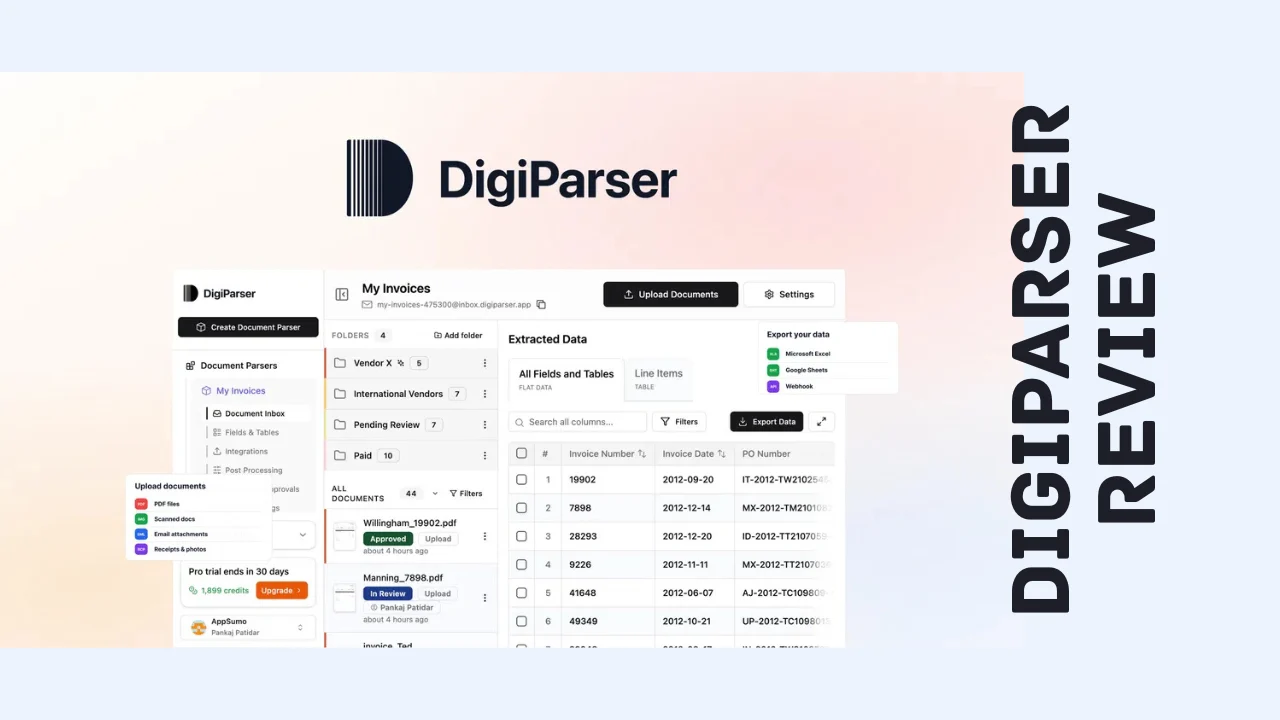
- Email inbox processing, letting you forward documents with attachments directly to a dedicated DigiParser inbox for automatic processing
- Multiple ingestion methods, including direct upload, API, and an embeddable widget depending on how your team or clients submit documents
- Smart folders and status organization, keeping parsed files organized by folder and review state so nothing gets lost
- AI-powered document routing, automatically classifying mixed batches so invoices go to one parser and bank statements go to another
- AI-powered document splitting, separating multi-document PDFs before parsing so combined files don’t get mangled into a single extraction
- Flexible export options, sending results as CSV, Excel, XML, or JSON, or pushing them directly to Google Sheets, QuickBooks, Salesforce, and other tools via webhooks and API
- Native integrations, including Gmail, Outlook, Google Drive, Dropbox, Salesforce, QuickBooks, Google Sheets, and Excel for pulling documents in and pushing extracted data out automatically
- Per-field confidence scores, showing you exactly how certain the AI is about each extracted value so you know where to double-check
- Review and approval workflows, with role-based access control for teams that need oversight before data gets pushed downstream
That combination of no-template extraction, flexible ingestion, and direct integrations with accounting and productivity tools is a genuinely complete workflow rather than just a raw data extraction engine you’d still need to wire up yourself.
Ease of Use & User Experience
Getting started with DigiParser is straightforward: upload a batch of documents, and the AI either detects the schema automatically or you build a custom parser by defining the specific fields you need. For common document types like invoices or bank statements, the pre-built templates mean you can be extracting real data within minutes rather than spending time on setup.
The dashboard gives clear visibility into your processing queue, so you can see the status of every document in a batch rather than wondering whether something got stuck. Smart folders keep parsed files organized, and the review-and-approval workflow is a practical touch for teams that want a human check before extracted data flows into accounting software or a CRM.
Email inbox processing is a particularly convenient touch for non-technical users: forwarding an invoice to a dedicated address is about as low a barrier to entry as document processing gets, and it works whether you’re at a desktop or on your phone. Based on user feedback, there is a modest learning curve when building more advanced custom parsers or fine-tuning AI extraction instructions for unusual document layouts, but the core bulk-upload-to-export workflow stays accessible even for non-technical users. DigiParser runs as a web-based dashboard, so it’s accessible from any modern browser without needing a separate app.
DigiParser Pricing Breakdown
DigiParser is available as a one-time payment for lifetime access instead of the recurring monthly or usage-based pricing that most document processing platforms charge. That structure is a significant part of what makes this DigiParser review worth reading if you’re comparing costs against tools that charge per page or per API call indefinitely, since a single upfront payment can save real money for anyone processing documents regularly over the long term.
All tiers include the core toolkit: bulk upload, table extraction, automatic schema detection, CSV/Excel/XML/JSON export, email inbox processing, smart folders, review and approval workflows, role-based access, integrations, document classifiers, per-field confidence scores, AI-powered splitting, MCP server access, and API access. What changes between tiers is your monthly page credit allowance, the number of parsers and team members, hosting region options, and access to BYOK (bring your own key) and white-labeling on the highest tiers.
| What’s Included | Tier 1 | Tier 2 | Tier 3 | Tier 4 (Most Popular) | Tier 5 | Tier 6 |
|---|---|---|---|---|---|---|
| Price | $69 (regular $232) | $169 (regular $812) | $299 (regular $2,320) | $469 (regular $4,640) | $999 (regular $6,020) | $2,999 (regular $8,980) |
| Access | Lifetime | Lifetime | Lifetime | Lifetime | Lifetime | Lifetime |
| Page credits/month | 100 | 350 | 1,000 | 2,000 | 5,000 | 7,500 |
| Parsers | 5 | 25 | 50 | 100 | Unlimited | Unlimited |
| Team members | 5 | 25 | 50 | 100 | Unlimited | Unlimited |
| Hosting region | US | US | US or EU | US or EU | US or EU | US or EU |
| BYOK support | No | No | No | No | Yes | Yes |
| White-labeling & sub-accounts | No | No | No | No | No | Yes (50 sub-accounts) |
| Refund window | 60 days | 60 days | 60 days | 60 days | 60 days | 60 days |
Every tier is backed by a 60-day refund window, giving you enough time to run real documents through the parser and confirm the accuracy fits your needs before deciding to keep it. There isn’t a separate free trial beyond that guarantee, but the refund period functions as a full trial run since the purchase is one-time rather than a subscription you’d need to actively cancel.
For a freelancer or solo operator processing a modest volume of invoices, Tier 1 or Tier 2 should comfortably cover regular use. Small businesses with a team reviewing and approving extracted data will want Tier 3 or Tier 4 for the higher parser and team member limits. Agencies and consultants managing document workflows across multiple clients should look at Tier 5 or the white-labeled Tier 6, which adds sub-accounts and lets you run the platform under your own brand. Compared to usage-based competitors charging per page indefinitely, DigiParser pricing as a one-time payment stands out as one of the more affordable software options for anyone processing documents on a recurring basis.
Pros and Cons
| Pros | Cons |
|---|---|
| One-time lifetime payment instead of ongoing per-page or subscription costs | Monthly page credits still cap usage, even on a lifetime plan |
| No templates required, AI detects schema and fields automatically | Custom parser setup for unusual documents has a modest learning curve |
| Genuinely broad native integrations, including QuickBooks and Salesforce | BYOK and white-labeling are reserved for the two highest tiers |
| Email inbox processing makes document intake nearly effortless | Team member and parser limits require upgrading as you scale |
| AI-powered routing and splitting handle messy, mixed document batches | Fine-tuning AI extraction instructions takes some trial and error |
| Per-field confidence scores make it easy to spot extractions worth checking | Smaller company means slower support turnaround than large enterprise vendors |
| 60-day refund window on every tier | Higher-volume users will eventually need a higher-priced tier |
Who Should Use It?
DigiParser is a strong fit if you recognize your situation in any of these groups:
- Freelancers and consultants who need to process client invoices, receipts, or contracts without manual data entry
- Small business owners who want extracted invoice and PO data flowing directly into QuickBooks, Google Sheets, or their accounting workflow
- SaaS and tool founders who need document parsing as part of a broader product or internal workflow, supported by API and MCP access
- Agencies and consultants managing document processing for multiple clients, especially with the white-labeled sub-account option on the highest tier
- Anyone still manually copying data from PDFs and emails into spreadsheets or business software on a recurring basis
It’s less of a fit if your document volume is extremely low and irregular, where a one-off manual entry might be simpler than setting up a parser at all. But for anyone dealing with recurring invoices, receipts, or structured documents on any regular basis, DigiParser stands out as one of the more genuinely useful productivity tools for entrepreneurs who want to stop losing hours to copy-paste work.
Comparison With Competitors
| Feature | DigiParser | Nanonets | Docsumo |
|---|---|---|---|
| Pricing model | One-time lifetime payment | Usage-based, starting around $499/mo | Subscription, starting around $299/mo |
| No-template AI extraction | Yes | Yes | Yes |
| Email inbox document ingestion | Yes | Limited | Limited |
| Native accounting integrations | QuickBooks, Salesforce, and more | Limited without custom setup | Strong for invoice-specific workflows |
| AI document routing and splitting | Yes | Yes | Limited |
| White-labeling for agencies | Yes (Tier 6) | No | No |
| Best for | Small businesses and agencies wanting predictable, one-time cost | Enterprises with complex, high-volume document workflows | Teams focused specifically on invoice and AP automation |
Nanonets is a capable platform for complex, high-volume document processing, but its usage-based pricing can run significantly higher than DigiParser’s one-time cost, and predicting your monthly bill isn’t always straightforward. Docsumo brings strong invoice-specific validation rules but is priced as an ongoing subscription and lacks DigiParser’s email-based ingestion and broader document type flexibility. If you’re weighing DigiParser alternatives, the honest takeaway is that Nanonets or Docsumo may make sense for large enterprises with complex compliance needs, while DigiParser’s combination of no-template extraction, broad integrations, and predictable one-time pricing makes it the stronger fit for small businesses and agencies that want to budget confidently.
User Feedback Summary
DigiParser has built up a solid review base since its 2024 launch, and the sentiment is clearly positive. Users consistently praise the accuracy of the AI extraction, along with responsive support from the founding team when questions or edge cases come up. The versatility of the platform, being able to handle invoices, receipts, bank statements, and custom document types without rebuilding a parser from scratch, comes up repeatedly as a key strength.
The more critical feedback centers on a modest learning curve when setting up custom parsers for unusual document types, along with occasional requests for clearer guidance on how to phrase AI extraction instructions to get the most accurate results. Neither issue appears to be a dealbreaker for most reviewers, and the overall sentiment leans strongly positive, with reviewers specifically noting that the team continues shipping meaningful updates, including a recent expansion of native integrations and additional pricing tiers based directly on customer feedback.
For anyone comparing notes before buying, the pattern in user feedback is consistent: DigiParser delivers on accuracy and flexibility, and the team’s responsiveness to feature requests is a notable point in its favor for a smaller, founder-led company.
Frequently Asked Questions
What is DigiParser used for?
DigiParser is an AI-powered document parsing tool that extracts structured data from invoices, purchase orders, receipts, bank statements, and other documents without requiring templates. It’s used by freelancers, small businesses, and SaaS founders to automate data entry and push extracted information directly into accounting or business tools.
Is DigiParser a one-time payment or a subscription?
DigiParser is currently sold as a one-time lifetime payment across six pricing tiers, rather than a recurring monthly subscription. Each tier includes a set number of monthly page credits, parsers, and team members, with BYOK and white-labeling available on the higher tiers, backed by a 60-day refund window.
Does DigiParser require templates to extract data?
No, DigiParser’s AI automatically detects the schema and fields in a document without requiring a pre-built template. You can also create custom parsers with specific fields for unique document types, or start from pre-built templates for common documents like invoices and bank statements.
How is DigiParser different from Nanonets or Docsumo?
Nanonets uses usage-based pricing that can climb significantly at volume, and Docsumo runs on an ongoing subscription focused mainly on invoice workflows. DigiParser offers a one-time lifetime payment, broader native integrations including QuickBooks and Salesforce, and email-based document ingestion that neither competitor matches as directly.
Can DigiParser process documents sent by email?
Yes, DigiParser includes email inbox processing, letting you forward documents with attachments directly to a dedicated DigiParser inbox for automatic parsing. This is one of the simplest ways to get documents into the system without manually logging in and uploading files each time.
What integrations does DigiParser support?
DigiParser connects natively with Gmail, Outlook, Google Drive, Dropbox, Salesforce, QuickBooks, Google Sheets, and Excel, along with Zapier, Make, and Pabbly Connect for broader automation. Extracted data can also be pushed via webhooks or API to custom apps and workflows.
Is DigiParser good for small businesses and freelancers?
DigiParser is built with small businesses, freelancers, and solo founders specifically in mind, with entry-level pricing tiers that comfortably cover modest document volumes. Combined with its one-time payment model, it’s one of the more affordable software options for anyone who wants to stop manually entering invoice and receipt data.
Does DigiParser offer a refund if it doesn’t work for me?
Yes, every DigiParser pricing tier includes a 60-day refund window, giving you enough time to run real documents through the parser, test the accuracy against your actual document types, and decide whether the workflow fits your business before the refund period closes.
Final Verdict
Wrapping up this DigiParser review, the platform earns a genuine recommendation for freelancers, small businesses, and SaaS founders who deal with recurring documents and want accurate data extraction without building or maintaining templates. The combination of no-template AI extraction, flexible ingestion methods like email forwarding, and broad native integrations with accounting and productivity tools makes it a genuinely complete solution rather than just a raw parsing engine.
It’s not without trade-offs. Monthly page credits still cap usage even on a lifetime plan, and getting the most out of custom parsers for unusual document types takes a bit of trial and error. But backed by consistently strong user feedback and a founding team that’s clearly still actively improving the product, DigiParser delivers real value at a one-time price, and it’s well worth testing against your own document workflow before committing to a pricier, usage-based alternative.