Manually copying leads off LinkedIn, pasting them into a spreadsheet, then hunting down their email addresses one by one is the kind of work that eats an entire afternoon and still leaves you with a messy list. This Retriever AI review looks at a tool built to kill that exact workflow — an AI agent that runs inside your actual browser, reads the real structure of a page instead of just guessing from a screenshot, and completes tasks like scraping, form-filling, and outreach end-to-end.
Retriever AI is built for marketers, small business owners, and solopreneurs who need lead lists, competitor monitoring, and web automation without hiring a developer or paying for a scraper that breaks every time a website updates its layout. Instead of stitching together five different tools, Retriever puts one agent to work across your browser, the cloud, and even your own website.
This review breaks down what Retriever AI actually does, how the pricing works, how it holds up day-to-day, and how it compares to established names like PhantomBuster and Browse AI.
Overview of Retriever AI
Retriever AI launched in 2025 out of San Francisco, built by Arjun Chintapalli and Bhavani Kalisetty, two engineers who spent years at Google building the machine learning and publisher infrastructure behind ads at massive scale. That background shows up in how the product is positioned: reliability and accuracy over flashy demos.
The mission behind Retriever is simple. The web holds most of the data and tasks businesses run on, but getting at any of it usually means hours of manual copy-paste or a developer maintaining a scraper that snaps the moment a site redesigns its layout. Retriever’s answer is an AI agent that reads a page’s actual DOM structure rather than taking a screenshot and guessing where to click, which the company says makes it more reliable for longer, multi-step workflows than typical browser agents.
The traction so far backs that up. Retriever reportedly ranked first on WebBench, a benchmark comparing AI agent performance, ahead of agents from both OpenAI and Anthropic, at a fraction of the cost. The platform has run more than 4 million workflows for over 30,000 users and landed in the top three products on Product Hunt at launch. The target audience is squarely marketers, small businesses, and solopreneurs who need lead generation, outreach, and web monitoring handled without a technical team.
Key Features
Retriever AI splits its functionality across three modes: a Chrome extension for your logged-in browser, cloud browsers for scaled automation, and an embeddable agent for your own website. Here’s what stands out among Retriever AI’s features:
- Lead extraction from any web page, pulling names and details, then enriching them against pre-indexed LinkedIn, Crunchbase, and verified work-email datasets
- ICP scoring, ranking every extracted lead against your ideal customer profile before you spend time on outreach
- Outreach from your real, logged-in session, sending connection requests and personalized messages that look like they came from you, not a bot
- Parallel background tasks, running 10 or more automations simultaneously without disrupting your active browser tabs
- Cloud browser fleets, letting you scrape data, enrich spreadsheets, and monitor thousands of URLs at once without tying up your own machine
- Multiple trigger options, including API, MCP, WhatsApp, or scheduled runs, so automations keep working while you’re offline
- Hosted MCP server, letting you connect Retriever to other AI tools and workflow builders by pasting a single URL
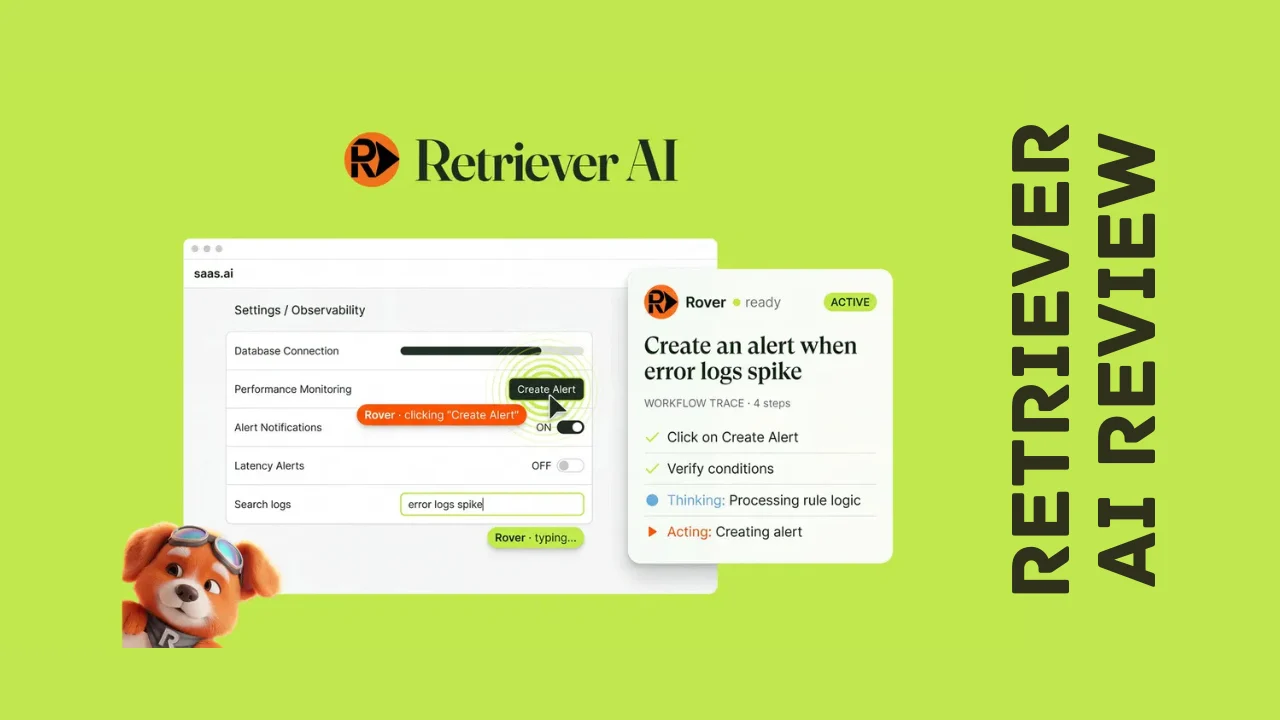
- Rover embeddable agent, installed on your own website with one script tag to onboard users, run product demos, and complete checkout flows inside your real interface
- Built-in analytics, tracking task completion rates, accessibility scores, and consistency across every human and AI visit to your site
- Agent memory, allowing Retriever to retain what it learns from previous runs and improve over time
- No-code setup, meaning you describe what you want done in plain English rather than writing scraping scripts
- Form-filling and checkout automation, going beyond scraping to actually complete multi-step actions like job applications or purchases
That combination of browser extension, cloud scale, and website embedding is a wider net than most competing scraping tools cast, and it’s clearly built for people who want the agent to finish the task, not just collect data.
Ease of Use & User Experience
Getting started with Retriever AI mostly comes down to installing the Chrome extension and describing what you want done in plain English. Because the agent reads the actual page structure instead of relying on screenshots, it tends to handle multi-step tasks, like filling out a form and then submitting it, more reliably than agents that rely on visual guesswork.
The dashboard separates your work into the extension for logged-in browser tasks, the cloud environment for scaled or scheduled jobs, and the Rover embed for anything running on your own website. That separation makes sense given how differently each mode is used, though it does mean a small learning curve if you’re trying to use all three at once right out of the gate.
For simple use cases, like pulling a list of leads off a single page, most users report being productive within minutes. More complex, multi-step workflows, such as chaining scraping, enrichment, and outreach into one sequence, take a bit more setup time to get right. The extension runs in Chrome specifically, so if your team relies on another browser day-to-day, you’ll want to confirm compatibility before committing. Cloud and Rover features are accessible from any browser since they run server-side rather than depending on a local extension.
Retriever AI Pricing Breakdown
Retriever AI is sold as a one-time payment for lifetime access rather than a recurring monthly subscription, which is one of the bigger draws behind this Retriever AI review if you’re comparing it against competitors that charge $50 to $400 a month for similar browser automation. Every tier includes the full core toolkit: the Chrome extension, cloud browsers, enrichment datasets, API and MCP access, and scheduled runs, all for life.
What changes between tiers is your one-time activation credit balance, your monthly recurring credits, and how many websites you can run the Rover embed on.
| What’s Included | Tier 1 | Tier 2 | Tier 3 (Most Popular) | Tier 4 |
|---|---|---|---|---|
| Price | $49 (regular $120) | $129 (regular $360) | $199 (regular $600) | $399 (regular $1,200) |
| Access | Lifetime access | Lifetime access | Lifetime access | Lifetime access |
| One-time activation credits | 1,000 | 2,000 | 5,000 | 10,000 |
| Monthly credits | 250/month | 500/month | 1,000/month | 3,000/month |
| Websites (Rover embed) | 1 | 5 | 15 | 30 |
| BYOK, private mode, custom branding | Included | Included | Included | Included |
| Cloud API, remote triggers, hosted MCP | Included | Included | Included | Included |
| Refund window | 60 days | 60 days | 60 days | 60 days |
Every tier is backed by a 60-day refund window, giving you enough time to run real lead-generation or scraping tasks before deciding whether to keep it. There isn’t a separate free trial beyond that guarantee, but the refund period functions similarly since you can fully test the workflow before the window closes.
For solopreneurs or a single small business running occasional lead lists, Tier 1 or Tier 2 should cover most needs. Agencies or teams running Rover on multiple client websites, or teams doing heavier monthly scraping and enrichment volume, will get more value out of Tier 3 or Tier 4. Compared against the ongoing monthly costs of tools like PhantomBuster, Retriever AI pricing structured as a one-time payment stands out as one of the more affordable software options for anyone who wants browser automation without a recurring bill eating into their margins.
Pros and Cons
| Pros | Cons |
|---|---|
| One-time lifetime payment instead of a monthly subscription | Chrome extension only, no support for other browsers yet |
| Reads actual page structure instead of guessing from screenshots | Monthly credit allowance can run low with heavy automation |
| Combines browser extension, cloud scale, and website embedding in one tool | Complex, multi-step workflows have a modest learning curve |
| Strong lead enrichment against LinkedIn, Crunchbase, and email datasets | Website count for Rover embed is capped by tier |
| Backed by founders with deep ad infrastructure experience at Google | Relatively young company with a smaller review base |
| Rover embed turns your own site into a self-guided agent for visitors | Some advanced features require understanding of API or MCP setup |
| 60-day refund window on every tier | Higher-volume use cases may need a pricier tier |
Who Should Use It?
Retriever AI is a strong fit if you recognize your workflow in any of these groups:
- Marketers and growth teams who need to build lead lists, score them against an ideal customer profile, and launch outreach without manual data entry
- Small business owners and solopreneurs who want lead generation and web monitoring handled without hiring a developer
- Founders and consultants who need competitor monitoring or repetitive research tasks automated in the background
- SaaS and product teams who want to embed an AI agent on their own site to onboard users, run demos, or guide visitors through checkout
- Agencies managing lead generation or web automation across several client accounts
It’s less of a fit if your needs are limited to a single one-off scrape you’ll never repeat, where a free tool might do the job. But for anyone doing recurring lead generation, monitoring, or outreach, Retriever AI holds up as one of the more practical productivity tools for entrepreneurs who want to automate real work rather than just chat with an AI about it.
Comparison With Competitors
| Feature | Retriever AI | PhantomBuster | Browse AI |
|---|---|---|---|
| Pricing model | One-time lifetime payment | Monthly subscription (~$59–$439/mo) | Freemium, credit-based (~$48–$500/mo) |
| Reads live page structure (not screenshots) | Yes | No (cookie-based automation) | Point-and-click robot training |
| Built-in lead enrichment (LinkedIn, email) | Yes | Limited, add-on credits | Not core focus |
| Cloud browser scaling | Yes | Yes | Yes |
| Embeddable agent for your own website | Yes | No | No |
| Form-filling and checkout automation | Yes | Limited | No |
| Best for | End-to-end lead gen and web tasks | Multi-platform social automation | No-code website monitoring and scraping |
PhantomBuster has a long track record and a large Phantom library for automating actions across social platforms, but its execution-hour pricing model can get expensive at volume, and its LinkedIn automation relies on stored session cookies, which carries account-ban risk. Browse AI is excellent for training simple scraping robots without any code, but it isn’t built for lead enrichment or completing multi-step actions like form-fills and outreach. If you’re weighing Retriever AI alternatives, the honest takeaway is that PhantomBuster and Browse AI both do pieces of what Retriever does, while Retriever’s structural approach and one-time pricing make it a stronger all-in-one option for teams that want scraping, enrichment, and outreach handled by a single agent.
User Feedback Summary
Retriever AI is still a young platform, having launched in 2025, so it doesn’t carry the review volume of tools that have been on the market for years across major software review platforms. That said, early user sentiment sits solidly positive, with an overall rating in the low 4s out of 5 from the reviews available so far.
Recurring praise in this Retriever AI review’s research centers on how reliable the browser automation feels compared to other agents, along with strong marks for the “bring your own key” option and how actively the founders respond to feedback and ship updates. Users also point to the accuracy of reading actual page structure rather than relying on screenshots as a meaningful difference from typical browser agents that tend to misclick on complex pages.
On the critical side, a smaller group of users mention a learning curve when setting up more complex, multi-step workflows, and some note that credit limitations can become a factor with heavier usage. Neither issue appears to be a dealbreaker for most reviewers, and the overall sentiment leans clearly toward satisfied, especially among users doing lead generation and outreach work.
Frequently Asked Questions
What is Retriever AI used for?
Retriever AI is a browser-based AI agent that automates web tasks like scraping leads, enriching contact data, filling out forms, and sending outreach. It works from your logged-in browser, in the cloud for larger jobs, or embedded directly on your own website to guide visitors through demos or checkout.
Is Retriever AI a one-time payment or a subscription?
Retriever AI is currently sold as a one-time lifetime payment across four pricing tiers, rather than a recurring monthly subscription. Each tier includes activation credits, monthly recurring credits, and a set number of websites for the embeddable agent, backed by a 60-day refund window.
How is Retriever AI different from PhantomBuster?
PhantomBuster automates social platform actions using stored session cookies and charges a recurring monthly subscription based on execution hours. Retriever AI reads a page’s actual structure rather than relying on cookies or screenshots, includes built-in lead enrichment, and is sold as a one-time payment instead of an ongoing subscription.
Does Retriever AI work for LinkedIn lead generation?
Yes, LinkedIn lead generation is one of Retriever AI’s core use cases. It can pull names and details off LinkedIn pages, enrich them against pre-indexed profile and email datasets, score them against your ideal customer profile, and send connection requests or outreach from your own logged-in session.
What is Rover in Retriever AI?
Rover is Retriever AI’s embeddable agent, installed on your own website with a single script tag. Once installed, it reads your site’s live structure and can onboard new users, run product demos, and complete tasks like checkout directly inside your existing interface, without redirecting visitors elsewhere.
Is Retriever AI good for small businesses?
Retriever AI is built with small businesses and solopreneurs specifically in mind, offering entry-level pricing tiers and a one-time payment model instead of a recurring bill. That structure makes it one of the more affordable software options for small teams that want lead generation and web automation without hiring extra staff.
Does Retriever AI offer a refund if it doesn’t work for me?
Yes, every Retriever AI pricing tier includes a 60-day refund window, giving you time to run real automation tasks against your own workflow before deciding whether to keep it. That’s on top of the founders’ active engagement with user feedback, which many reviewers point to as a reassuring sign for a newer product.
Can Retriever AI replace tools like Clay or Browse AI?
Retriever AI covers much of the same ground as Clay and Browse AI, including lead enrichment and no-code data extraction, while adding form-filling, checkout automation, and a website-embeddable agent that neither of those tools offers. Whether it fully replaces them depends on how deeply your workflow relies on features unique to each platform.
Final Verdict
Wrapping up this Retriever AI review, the platform earns a strong recommendation for marketers, small business owners, and solopreneurs who need real lead generation and web automation without hiring a developer or paying an ongoing subscription. The combination of accurate, structure-based automation, built-in enrichment, and the option to embed an agent directly on your own website is a genuinely differentiated package.
It’s not without trade-offs. The Chrome-only extension limits flexibility for non-Chrome users, and heavier automation needs will require budgeting for a higher tier’s credit allowance. But backed by founders with serious engineering credentials and results that already outperform bigger-name competitors on independent benchmarks, Retriever AI delivers real value at a one-time price. For anyone tired of manually copying leads or maintaining a scraper that breaks every few weeks, it’s well worth testing against your own workflow before committing to a pricier, subscription-based alternative.