Recording a decent voiceover used to mean a quiet room, a decent mic, several retakes, and probably still sounding a little off. If you have ever tried narrating a video under a blanket to kill the echo, you already know the struggle. Vocallab AI was built to remove that whole process and replace it with a browser-based studio where you type a script and get back a studio-quality voice in seconds.
This Vocallab AI review looks at what the tool actually does, how well it performs, what it costs, and whether it’s a smart pickup for startups, marketers, content creators, and small business owners who need voice content without hiring a studio or a voice actor. Vocallab AI is designed for anyone producing YouTube videos, podcasts, ads, training material, or audiobooks who wants professional narration without the traditional overhead.
Overview of the Product
Vocallab AI is a neural text-to-speech and voice cloning platform built for creators, developers, and businesses that need realistic voice content fast. The company was founded in late 2025 by a small, ambitious team based in Tel Aviv, with a straightforward mission: strip the complexity out of voiceover production so anyone can generate ultra-realistic speech and custom voices without needing an audio engineer or expensive recording setup.
The team behind Vocallab AI recognized that traditional audio workflows ate up time that creators would rather spend on the actual content. Instead of scheduling studio time or hiring freelance voice talent for every project, Vocallab AI lets you generate the voice directly, using either a built-in library or a clone of your own voice.
The target audience leans heavily toward podcasters, YouTubers, course creators, marketers, and small agencies producing video or audio content on a regular basis. It’s also a genuinely useful pick for solopreneurs who record training material, ads, or product demos and don’t want to sound like they’re reading off a script in a closet.
Key Features
Vocallab AI packs a surprising amount of control into a browser-based tool. Here’s a breakdown of the core Vocallab AI features:
- 260 professional AI voices – Browse by accent, age, gender, and style to find a voice that actually fits your brand or project.
- Voice cloning – Clone any voice from a short audio sample with one click, then reuse that clone consistently across every future project.
- Voice Design – Describe the voice you want in plain language, including accent, age, gender, and tone, and the platform generates a brand-new synthetic voice from that description.
- Performance control tags – Add breaths, laughs, sighs, and throat clears anywhere in your script using simple tags so the delivery sounds human instead of robotic.
- Eight emotion settings – Match tone to context, whether you need something warm and conversational or serious and authoritative.
- Adjustable pacing – Fine-tune how fast or slow each line reads so timing lines up with your video or ad.
- Word-level SRT captions – Export karaoke-style captions built specifically for YouTube Shorts, Reels, and TikTok.
- MP3 and WAV export – Download finished audio in the format your workflow needs, ready to drop into your editor.
- Audiobooks workspace – Sequence voiceovers chapter by chapter for long-form projects, including a newer ebook-to-audiobook feature that auto-detects narrators and characters from an uploaded manuscript.
- Speech to Text – Upload or record audio and get an accurate transcript across more than 25 languages, useful for repurposing existing content.
- Editor integrations – Works directly alongside Adobe, DaVinci Resolve, and Final Cut Pro for a smoother post-production pipeline.
- API and MCP access – Available on higher tiers for developers and teams who want to plug voice generation directly into their own apps or AI assistants.
That combination of cloning, design, and fine emotional control is a big part of why this keeps coming up in conversations about the best tools for small business content production.
Ease of Use & User Experience
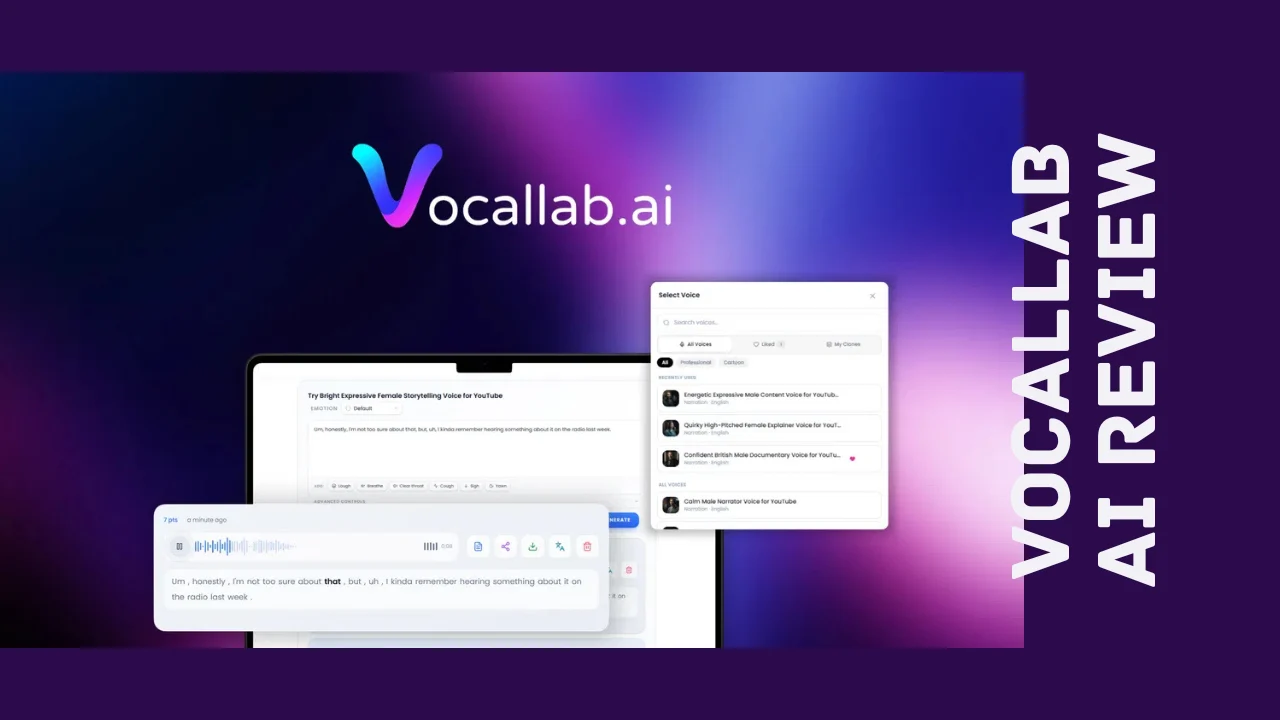
Vocallab AI runs entirely in the browser, so there’s no software to install and no rendering delays tied to your laptop’s specs. Setup is quick: create an account, pick or clone a voice, paste in your script, and generate. The interface keeps the voice library, script editor, and export options on one screen, which makes it easy to preview a line, tweak the emotion or pacing, and regenerate without hunting through menus.
Voice cloning is genuinely one of the smoother parts of the experience. You upload a short sample, the platform processes it, and the clone shows up in your library ready to reuse on future projects. Voice Design works the same way in reverse: describe the voice you’re picturing, and if the wording is vague, a built-in “Improve” option rewrites your description into something the model interprets more accurately.
The audiobook workspace is a step up in complexity, since it involves managing chapters, casting different voices to different characters, and sequencing longer projects, but it’s still organized in a way that doesn’t require a manual to figure out. Recent updates also added batch script pasting, so you’re not copying content in line by line.
On the feedback side, users consistently describe the interface as intuitive, and the team has a visible habit of shipping fixes and feature requests quickly, often within the same week they’re reported. The rough edges show up mostly around voice cloning accuracy on certain samples and how credits get consumed on longer projects, both of which are worth testing during the refund window before committing to a specific tier.
Vocallab AI Pricing Breakdown
Vocallab AI pricing is currently structured as a one-time payment for lifetime access rather than an ongoing monthly subscription, which matters a lot if you’re trying to control software costs as a small business. Here’s how the current Vocallab AI lifetime deal tiers compare:
| Plan | Price | Seats | Minutes/Month | Characters per Generation | Audio History | Voice Clones | Voice Designs | Audio Quality | API Access |
|---|---|---|---|---|---|---|---|---|---|
| Tier 1 | $49 (one-time) | 1 | 50 (3,000 points) | Up to 10,000 | 30 days | 1 | 1 | Pro | Not included |
| Tier 2 | $139 (one-time) | 1 | 150 (9,000 points) | Up to 40,000 | 90 days | 10 | 5 | Studio | Not included |
| Tier 3 | $299 (one-time) | 1 | 400 (24,000 points) | Up to 40,000 | 90 days | 100 | 20 | Studio | 60 calls/minute |
| Tier 4 | $699 (one-time) | 3 (shared pool) | 1,000 (60,000 points) | Up to 40,000 | 180 days | 200 | 40 | Studio | 120 calls/minute |
A few important notes on Vocallab AI pricing:
- All four tiers come with lifetime access, so there’s no recurring bill once you’ve purchased a plan.
- There’s a 60-day refund window, giving you time to actually test voice quality and cloning accuracy against your own content before deciding it’s a keeper.
- Higher tiers add priority generation, WAV downloads, MCP access, commercial usage rights, and access to the Audiobooks workspace, alongside the higher monthly minute allowances.
- Monthly generation limits reset every month, so unused minutes don’t carry forward, which is worth factoring in when picking a tier that matches your actual output.
- Tier 4 is built for small teams, with three seats sharing one combined pool of monthly minutes rather than separate individual allowances.
For a solo podcaster or YouTuber, Tier 1 or Tier 2 will likely cover a steady content schedule. Agencies or businesses producing high volumes of ads, training material, or audiobooks will get more value from Tier 3 or Tier 4, especially with API access and the higher voice clone limits.
Pros and Cons
| Pros | Cons |
|---|---|
| One-time payment instead of a recurring subscription | Entry tier caps at only 50 minutes per month |
| 260 built-in voices plus unlimited-style voice cloning | Voice cloning accuracy can vary depending on sample quality |
| Voice Design lets you build a custom voice from a text prompt | API and MCP access locked to the top two tiers |
| Word-level karaoke-style captions built for short-form video | Credit usage on longer projects takes some getting used to |
| Fine control over emotion, pacing, breaths, and pauses | Commercial use rights not included on every tier |
| Audiobook and ebook-to-audiobook workspace for long-form projects | Newer product, so some features are still in beta |
| Fast, responsive support and frequent feature updates | Monthly minutes reset rather than roll over |
| 60-day money-back guarantee |
Who Should Use It?
Vocallab AI is built for people who need voice content regularly but don’t have the time, budget, or setup for traditional voiceover production. That includes:
- YouTubers and podcasters who need consistent narration without booking studio time for every episode or video.
- Content creators and course builders producing training material, tutorials, or educational content at volume.
- Marketers and small agencies creating ads, product demos, or social clips that need fast turnaround and short-form captions.
- Authors and publishers exploring audiobook production without hiring a full voice cast.
- Founders and solopreneurs who record explainer videos, onboarding material, or internal presentations and want a polished, consistent voice every time.
If any of that sounds like your weekly workload, this tool is worth a serious look, especially compared with what traditional voiceover production or per-project freelance rates would cost over time.
Comparison With Competitors
| Feature | Vocallab AI | Descript | Speechelo |
|---|---|---|---|
| Pricing model | One-time lifetime payment | Monthly subscription | One-time payment |
| Voice library size | 260 voices | Smaller built-in library | Around 30 voices |
| Voice cloning | Yes, with adjustable clone limits by tier | Yes, on higher-priced plans | No |
| Custom voice creation from text prompt | Yes, via Voice Design | No | No |
| Word-level karaoke captions | Yes | Yes, as part of video editing | No |
| Audiobook/chapter workspace | Yes, including ebook-to-audiobook | Limited | No |
| Editor integrations | Adobe, DaVinci Resolve, Final Cut Pro | Native video editor | Limited |
| Best for | Creators, podcasters, small teams | Video editors and podcasters | Simple voiceover on a budget |
When people search for Vocallab AI alternatives, Descript and Speechelo are the names that come up most often. Descript bundles voice generation into a full video and podcast editor but runs on a recurring subscription, while Speechelo is cheaper but far more limited in voice variety and cloning capability. Vocallab AI sits in between: broader voice options and stronger cloning than Speechelo, without the ongoing monthly cost of Descript.
User Feedback Summary
Public reviews currently put Vocallab AI at around 4.7 out of 5 stars from over 30 ratings, with the overwhelming majority landing in the top rating bracket. The most common praise centers on three things: how accurate and natural the voice cloning sounds, how intuitive the interface feels for a tool this technical, and how responsive the support team has been to feature requests and bug reports.
The criticism is minor but consistent across a few reviews. Some users mention that cloning accuracy can vary depending on the quality of the original audio sample, and a few have noted that figuring out credit usage on longer or more complex projects took some trial and error. Neither issue shows up as a dominant complaint, and the team has a clear pattern of shipping fixes quickly once problems get flagged.
Frequently Asked Questions
What is Vocallab AI used for?
Vocallab AI is a browser-based platform for generating realistic AI voiceovers, cloning voices, and exporting captions. It’s used by podcasters, YouTubers, marketers, and businesses to create narration for videos, ads, training content, and audiobooks without hiring voice actors or studio time.
Is Vocallab AI a one-time payment?
Yes. Rather than billing monthly, Vocallab AI currently offers lifetime access through a single one-time payment, with four tiers based on monthly minutes, voice clones, and audio quality. This makes Vocallab AI pricing more predictable than typical subscription-based voiceover tools.
Can Vocallab AI clone my own voice?
Yes, this is one of the standout Vocallab AI features. You upload a short audio sample, and the platform generates a clone you can reuse across future projects. Higher tiers allow significantly more voice clones, along with improved cloning accuracy from recent model updates.
How many voices does Vocallab AI offer?
Vocallab AI includes a library of 260 professional AI voices that can be filtered by accent, age, gender, and style. On top of that library, users can clone their own voice or generate an entirely custom voice using the Voice Design feature by describing the tone and characteristics they want.
Is Vocallab AI good for small businesses and creators?
Yes, Vocallab AI was built with creators, podcasters, and small teams in mind. Its lower tiers cover a steady content schedule for solo creators, while higher tiers support agencies and small businesses producing higher volumes of voice content, making it a genuinely affordable software option in this category.
What are the best Vocallab AI alternatives?
The most commonly compared tools are Descript and Speechelo. Descript offers a broader video editing suite but runs on a monthly subscription, while Speechelo is cheaper but has a much smaller voice library and no real cloning feature. Vocallab AI lands in between on both price and capability.
Does Vocallab AI offer a refund if it doesn’t work out?
Yes. Vocallab AI currently backs its lifetime plans with a 60-day money-back guarantee, giving you enough time to test voice quality, cloning accuracy, and export workflows against your actual content before deciding whether to keep it long term.
Can Vocallab AI create audiobooks?
Yes. Vocallab AI includes a dedicated Audiobooks workspace for sequencing voiceovers chapter by chapter, plus a newer ebook-to-audiobook feature that can upload a manuscript, detect the narrator and characters automatically, and generate a finished audiobook file with natural, expressive delivery.
Final Verdict
Wrapping up this Vocallab AI review, this is a genuinely strong pick for anyone who needs consistent, realistic voice content without the cost or hassle of traditional voiceover production. The combination of a large voice library, accurate cloning, custom Voice Design, and fine emotional control puts it well ahead of budget alternatives, while the one-time lifetime pricing keeps it far cheaper over time than subscription-based competitors doing similar work.
It’s not without rough edges. The entry tier’s monthly minutes will feel tight for anyone producing content daily, and cloning quality depends somewhat on the sample you feed it. But the team’s track record of shipping fixes and new features quickly, combined with a 60-day refund window, makes it a low-risk way to find out if it fits your workflow.
If you’re a podcaster, YouTuber, course creator, or small business owner who records voice content regularly, Vocallab AI is worth trying. It hits a rare balance of real capability and genuine affordability, and for creators tired of either paying per-minute for voice talent or wrestling with clunkier, pricier software, it earns its place on the shortlist.